Are you tired of struggling with heavy cables and endless tangles? Using a cable puller efficiently can save you time, reduce frustration, and make your job much easier.
Whether you’re a professional or a DIY enthusiast, mastering this simple tool can transform how you handle cables. You’ll discover practical tips and tricks that help you work smarter, not harder. Keep reading to unlock the secrets of smooth, safe, and speedy cable pulling.
Your next project will thank you.

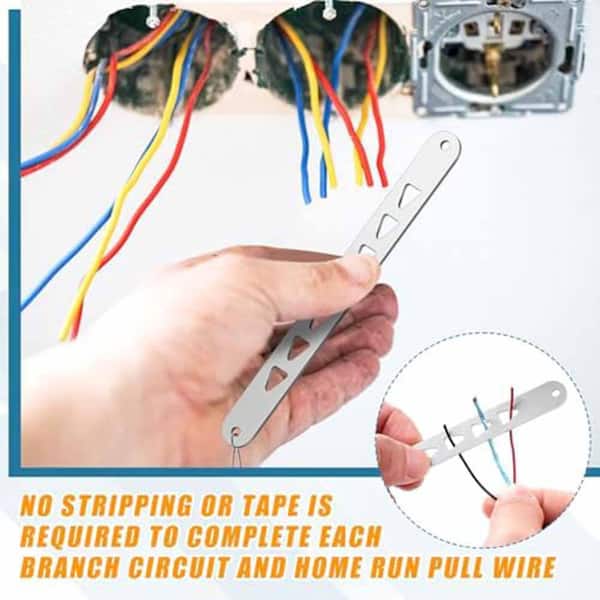
Credit: www.amazon.co.uk
Choosing The Right Cable Puller
Using a cable puller correctly makes your work easier and safer. Picking the right tool depends on what kind of job you need to do. This guide helps you choose the best cable puller for your needs.
Consider the types, features, and safety ratings before buying. Knowing these details helps you work efficiently and avoid accidents.
Types Of Cable Pullers
Cable pullers come in different styles. Each type fits specific tasks and conditions. Choose the one that matches your job size and environment.
- Manual Cable Pullers:Hand-operated and best for light jobs.
- Electric Cable Pullers:Powered tools for medium to heavy tasks.
- Hydraulic Cable Pullers:Use fluid pressure for very heavy loads.
- Ratchet Cable Pullers:Use a ratcheting mechanism for steady pulling.
Factors To Consider
| Factor | Details |
| Load Capacity | Choose a puller that can handle the cable weight safely. |
| Pulling Distance | Check the max distance the puller can operate effectively. |
| Power Source | Decide between manual, electric, or hydraulic based on power availability. |
| Portability | Consider the size and weight for easy transport to job sites. |
| Durability | Look for strong materials to last through tough jobs. |
Safety Ratings And Certifications
Always check for safety marks and certificates on cable pullers. These show the tool meets safety rules and quality standards. Using certified tools reduces risks and protects users.
- Look for OSHA or ANSI certification labels.
- Check if the tool has passed load testing.
- Read user manuals for safety instructions.
- Inspect the tool before use for any damage.
Credit: www.homedepot.com
Preparing For Cable Pulling
Before you start pulling cables, proper preparation is important. It helps to avoid damage and makes the work safer.
This guide shows how to prepare well by checking equipment, planning the route, and clearing obstacles.
Inspecting The Equipment
Check all tools and machines before use. Look for any signs of wear or damage on the cable puller.
Make sure the pulling grips, ropes, and winches work smoothly and safely. Replace any broken parts.
- Examine the cable puller frame and handles
- Test the tension controls and brakes
- Check ropes or cables for frays or cuts
- Ensure all connectors fit tightly
Assessing The Cable Route
Look at the path where the cable will go. Measure the distance and note all turns or bends.
Check for places where the cable might get stuck or damaged. Plan how to guide the cable safely.
- Measure total length of the cable path
- Identify sharp bends or corners
- Note changes in height or level
- Look for tight spaces or narrow passages
Clearing Obstacles
Remove any objects blocking the cable path. This prevents damage and eases the pulling process.
Keep the area clean and safe. Make sure workers have enough room to work and move.
- Clear debris, tools, and waste from the route
- Move furniture or equipment if needed
- Secure loose cables or wires nearby
- Mark or block off the work area to avoid accidents
Setting Up The Cable Puller
Using a cable puller correctly makes your work safer and easier. Setting up the tool properly is the first step to success.
This guide explains key setup points for anchoring, attaching cables, and adjusting tension controls.
Anchoring Techniques
Secure the cable puller firmly before use. A strong anchor prevents slips and accidents.
Choose a stable object like a tree, post, or vehicle frame. Check it can handle the pull force.
- Wrap the anchor strap tightly around the anchor point
- Use shackles or hooks to secure the puller to the anchor
- Ensure the anchor does not move during pulling
Proper Cable Attachment
Attach the cable correctly to avoid damage and slippage. Use the right hooks and clamps.
Inspect the cable for wear before attaching. Connect it to the puller and load securely.
- Use cable clamps to fasten the cable end
- Place hooks through the cable eye or loop
- Double-check all connections for tightness
Adjusting Tension Controls
Set the tension controls to match the job. Proper tension avoids cable damage and tool strain.
Increase tension slowly and watch the cable closely. Stop if you hear unusual sounds or see bends.
- Use the tension knob or lever to adjust pull strength
- Check tension gauges if available
- Release tension gradually after use to protect the cable
Maximizing Pulling Power
Using a cable puller correctly helps you move heavy cables with less effort. This guide shows how to get the most pulling power from your tool.
Focus on three key areas: using lubricants, adjusting pulling speed, and keeping force steady. Each affects the puller’s performance.
Using Lubricants Effectively
Lubricants reduce friction between the cable and the conduit. This makes pulling easier and protects the cable from damage.
- Choose a lubricant made for cable pulling.
- Apply it evenly along the cable length.
- Reapply if the cable gets dry during the pull.
- Use just enough lubricant to avoid mess and waste.
Optimizing Pulling Speed
Pulling too fast can cause the cable to catch or stretch. Pulling too slow wastes time. Find the right speed for your job.
| Speed Level | Effect |
| Slow | Less chance of damage, but slower progress |
| Moderate | Best balance of speed and safety |
| Fast | Risk of cable damage and tangling |
Maintaining Consistent Force
Keep the puller’s force steady to avoid sudden jerks. Jerks can harm the cable and increase effort.
Tips to keep force steady:
- Use a tension gauge to monitor force.
- Adjust your pull speed to keep tension stable.
- Stop and rest if force spikes suddenly.
- Check the puller setup for smooth operation.
Safety Practices During Operation
Using a cable puller requires careful attention to safety. Following proper practices helps avoid accidents and injuries.
Operators must be aware of the risks and take steps to protect themselves and others around the equipment.
Personal Protective Equipment
Wearing the right protective gear reduces the risk of harm. Always use equipment that fits well and is in good condition.
- Hard hats to protect the head
- Safety gloves for hand protection
- Steel-toed boots to shield feet
- Eye protection like safety glasses
- High-visibility clothing to stay seen
Monitoring Equipment Performance
Check the cable puller before and during use. Watch for signs of wear or malfunction that could cause failure.
| Inspection Point | What to Look For |
| Winch drum | Cracks or dents |
| Cable | Frays or kinks |
| Hooks and clamps | Secure attachment |
| Control mechanisms | Proper function |
Emergency Procedures
Know what to do if something goes wrong. Quick action can prevent injury and damage.
- Stop the machine immediately.
- Alert others nearby about the problem.
- Disconnect power if safe to do so.
- Follow site emergency protocols.
- Report the issue to the supervisor.
Post-pulling Maintenance
Using a cable puller properly is important, but maintaining it after use is just as crucial. Good maintenance helps your tool last longer and work better.
After pulling cables, take time to clean, inspect, and fix any problems. This keeps your cable puller ready for the next job.
Cleaning And Storage
Clean the cable puller after each use. Dirt and grease can cause damage if left on the tool. Use a dry cloth to wipe the cable and frame.
Store the cable puller in a dry place. Keep it away from moisture and dust to stop rust and wear.
- Remove dirt from cables and pulleys
- Use light oil on moving parts
- Keep the cable coiled properly
- Store in a covered, dry area
Routine Inspections
Check your cable puller regularly. Look for signs of wear or damage that can cause failure. Early detection keeps workers safe.
Inspect the cable for frays or broken strands. Check the frame and handle for cracks. Test the pulleys and grips for smooth action.
- Look for rust or corrosion
- Check cable for fraying or cuts
- Test moving parts for smooth movement
- Ensure all bolts and nuts are tight
Troubleshooting Common Issues
If the cable puller is hard to use, find the cause quickly. Common problems include stuck pulleys or a jammed cable.
Fix small issues before they get worse. Lubricate stuck parts and replace damaged cables. Avoid using the tool if it feels unsafe.
- Lubricate pulleys that do not spin freely
- Replace cables with broken strands
- Tighten loose bolts or screws
- Clean dirt blocking moving parts

Credit: m.transmissionlineequipment.com
Frequently Asked Questions
What Is The Best Way To Use A Cable Puller Efficiently?
To use a cable puller efficiently, ensure proper setup and secure attachment. Use steady, controlled pulls. Avoid sudden jerks to prevent cable damage. Regularly inspect the tool for wear. Follow manufacturer guidelines for safety and maintenance.
How Do I Prevent Cable Damage During Pulling?
Prevent cable damage by using smooth, steady pulling motions. Avoid sharp bends and excessive tension. Use protective sheaths or sleeves if necessary. Inspect cables before and after pulling. Properly align the cable puller to reduce friction and stress.
What Safety Tips Should I Follow When Using A Cable Puller?
Always wear protective gear like gloves and safety glasses. Check the cable puller for defects before use. Keep the work area clear of obstacles. Use the tool within its rated capacity. Follow all manufacturer safety instructions strictly.
How Can I Maintain My Cable Puller For Long-term Use?
Clean the puller after each use to remove dirt and debris. Lubricate moving parts regularly as per the manual. Store it in a dry, cool place. Inspect for damage or wear before and after use. Replace worn parts promptly to ensure safety.
Conclusion
Mastering cable puller usage boosts work efficiency. This tool saves time. It ensures safety. Proper techniques prevent injuries. Always check the equipment before use. This avoids accidents. Practice makes perfect. With regular use, tasks become easier. Follow instructions closely. They guide you well.
Remember to wear protective gear. Safety first, always. A well-maintained cable puller lasts longer. Routine checks are essential. Correct usage leads to better results. Happy pulling!