Are you tired of crooked pictures, uneven shelves, or misaligned tiles ruining your projects? Using a laser level for alignment can change everything.
It’s a simple tool that helps you get perfect straight lines every time, saving you time and frustration. In this guide, you’ll learn exactly how to use a laser level to make your work precise and professional-looking. Keep reading, and you’ll discover easy steps that anyone can follow to get flawless results.
Your next project is about to get a whole lot easier.

Credit: huepar.com
Choosing The Right Laser Level
Using a laser level helps you align objects with accuracy. Picking the right laser level makes your work easier.
Different projects need different types of laser levels. Knowing the features and budget helps you choose well.
Types Of Laser Levels
Laser levels come in many types. Each type fits certain tasks better than others.
- Line Laser Levels: Project horizontal or vertical lines for wall or tile alignment.
- Rotary Laser Levels: Spin a laser beam 360 degrees for large area leveling.
- Dot Laser Levels: Show points for precise alignment on surfaces.
- Combination Laser Levels: Offer lines and dots in one tool for versatile use.
Features To Consider
Look for features that match your needs. These features improve ease and accuracy.
- Self-leveling: Automatically adjusts the laser for level lines.
- Range: The maximum distance the laser can reach clearly.
- Visibility: Bright lasers are easier to see in daylight.
- Mounting Options: Ability to attach to tripods or walls.
- Durability: Water and dust resistance for tough work sites.
Budget And Brand Options
Laser levels come in many prices. Set a budget to find a good fit for you.
Trusted brands often offer quality and support. Check reviews to see which brands are reliable.
- Low-cost models: Good for simple, occasional tasks.
- Mid-range models: Balance of features and price.
- High-end models: Best accuracy and extra features for pros.
Setting Up Your Laser Level
Using a laser level helps you align objects with accuracy. Setting it up correctly is key to good results.
This guide explains how to prepare the surface, mount and position the laser level, and power it on properly.
Preparing The Surface
Start by cleaning the area where you will use the laser level. Dirt or dust can affect the laser’s accuracy.
Make sure the surface is stable and flat. This helps keep the laser steady during use.
- Remove dust and debris
- Check for bumps or uneven spots
- Use a stable base or tripod
Mounting And Positioning
Place the laser level on a tripod or flat surface. Position it so the laser beam points to your target area.
Adjust the height and angle to cover the needed space. Use the built-in mounts or clamps if available.
- Use a tripod for height control
- Clamp laser to walls or beams if needed
- Ensure laser beam hits the exact spot
Powering On And Calibration
Turn on the laser level using the power button or switch. Allow it to stabilize before use.
Calibrate the laser if your model needs it. Follow the manufacturer’s instructions for accurate alignment.
- Switch on the laser level
- Wait for the laser to stabilize
- Check calibration marks or use a calibration tool
- Adjust settings for level or plumb lines
Techniques For Accurate Alignment
Using a laser level helps you align objects with precision. It is important to follow certain techniques for the best results.
These techniques include using reference points, adjusting laser beams, and checking level and plumb lines carefully.
Using Reference Points
Reference points give you fixed locations to line up the laser. Mark these points before starting your work.
Use visible marks or physical objects as your guide. This helps keep your alignment consistent over distance.
- Mark the start and end points clearly
- Check reference points regularly
- Use a tape measure to verify distances
Adjusting Laser Beams
Adjust the laser beam so it hits the exact spot you need. Small changes improve your accuracy.
Use the laser’s adjustment knobs or buttons to move the beam slowly. Avoid sudden moves to keep control.
- Turn on the laser and check the beam position
- Move the adjustment controls gently
- Lock the beam once it is aligned
Checking Level And Plumb Lines
Always check the laser’s level and plumb lines before you start. This ensures your alignment is straight and vertical.
Use the built-in bubble vials or digital displays to confirm the laser is set correctly.
- Place the laser on a flat surface
- Check the bubble vial for level
- Adjust the laser until it shows perfectly level or plumb
Common Alignment Applications
Using a laser level helps keep projects straight and accurate. It saves time and reduces mistakes.
Many jobs need precise alignment. A laser level works well for walls, floors, and framing tasks.
Wall And Ceiling Installations
Laser levels guide you to place items evenly on walls and ceilings. They help install shelves, lights, and tiles.
Use the laser line to mark straight points. It makes hanging pictures or mounting cabinets easier and neater.
Flooring And Tiling
Laser levels ensure floor tiles and boards align perfectly. They show a straight line across the floor for accuracy.
Check level surfaces before placing tiles or flooring. This prevents uneven floors and reduces gaps or bumps.
- Set the laser at the starting point
- Follow the laser line while laying tiles
- Adjust tiles to keep them straight
Framing And Cabinetry
Laser levels help build straight frames and install cabinets evenly. They align studs, doors, and shelves quickly.
Use the laser to check both vertical and horizontal lines. It improves the fit and finish of your work.
Troubleshooting And Maintenance
Using a laser level correctly ensures precise alignment. Regular troubleshooting and maintenance keep your tool working well. This guide helps you solve common issues and care for your laser level.
Keep your laser level in top condition by following simple steps. Fix visibility problems, manage power, and clean your device for the best results.
Dealing With Laser Visibility Issues
Laser beams can be hard to see in bright light or on certain surfaces. Adjusting your environment and settings helps improve visibility.
- Use laser glasses designed for your laser color
- Shade the laser line with your hand or a screen
- Work in lower light areas if possible
- Check if the laser lens is clean and clear
- Adjust the laser brightness if your model allows
Battery And Power Tips
Power problems can cause your laser level to stop working or give weak beams. Proper battery care extends usage time and reliability.
| Tip | Detail |
| Use fresh batteries | Replace old batteries before use |
| Carry spare batteries | Keep extras on hand for long jobs |
| Recharge batteries properly | Follow manufacturer instructions |
| Check battery contacts | Clean contacts to ensure good power flow |
| Turn off when not in use | Save battery life by powering down |
Cleaning And Storage
Clean your laser level after each use to remove dust and dirt. Store it safely to protect from damage and keep it ready for the next job.
- Wipe the laser lens with a soft, dry cloth
- Use a small brush to clean vents and crevices
- Store in a protective case or box
- Keep in a dry, cool place away from direct sunlight
- Check for damage regularly and repair if needed

Credit: www.youtube.com

Credit: www.youtube.com
Frequently Asked Questions
What Is A Laser Level Used For In Alignment?
A laser level projects a straight line for precise alignment. It helps ensure objects are level or plumb during construction or DIY projects. This tool saves time and improves accuracy in tasks like hanging pictures or installing tiles.
How Do You Set Up A Laser Level Properly?
Place the laser level on a stable surface or tripod. Turn it on and adjust until the laser line is visible and level. Use built-in bubble vials or self-leveling features to ensure accuracy before starting your alignment work.
Can A Laser Level Work On Uneven Surfaces?
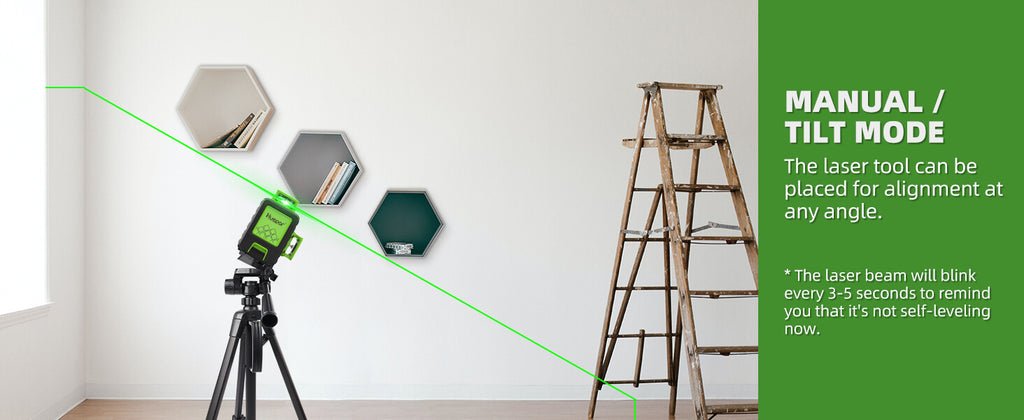
Yes, many laser levels have self-leveling features. They adjust the laser line automatically on uneven surfaces within a certain range. For larger uneven areas, manual adjustments or a tripod can help maintain accuracy.
What Safety Precautions Should I Follow Using A Laser Level?
Avoid direct eye exposure to the laser beam. Use laser levels with appropriate safety ratings. Always follow manufacturer instructions and wear safety glasses if recommended to protect your eyes during use.
Conclusion
Using a laser level helps you align objects with ease and precision. It saves time and reduces mistakes during projects. Always check the device is set up correctly before starting. Keep the laser level steady to get accurate lines every time.
Practice a few times to feel comfortable using it. This simple tool makes many tasks easier and more professional. Try it out and see how your work improves.