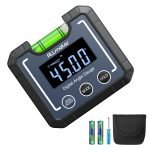
Have you ever found yourself struggling to measure angles accurately? You’re not alone.
Whether you’re a DIY enthusiast, a professional carpenter, or just someone who loves a good home project, precise angle measurement is crucial. Enter the digital protractor—a tool that promises accuracy and ease. Imagine completing your tasks with confidence, knowing that each angle is spot on.
Intrigued? You should be! This guide will walk you through how to measure angles with a digital protractor, transforming your projects and boosting your precision to new heights. Stay with us, and you’ll soon discover how this tool can become your go-to for all things related to angles.
Choosing The Right Digital Protractor
Measuring angles accurately is important for many projects. A digital protractor helps you do this with ease. Choosing the right one makes your work faster and more precise.
This guide explains the types of digital protractors, key features to check, and budget tips. It will help you pick the best tool for your needs.
Types Of Digital Protractors
Digital protractors come in different forms. Each type fits certain tasks better than others. Knowing the options helps you select the right one.
- Basic Digital Protractors:These are simple and easy to use. They show angle measurements on a small screen.
- Combination Squares:These tools include a digital protractor and ruler. They are good for woodwork and metalwork.
- Inclinometers:Used to measure angles relative to gravity. They work well for leveling and slope measurement.
- Bevel Protractors:Designed for precise angle measurement on flat surfaces. They often have a digital display for accuracy.
Key Features To Look For
When buying a digital protractor, certain features make a big difference. Check these to ensure your tool meets your needs.
| Feature | Why It Matters |
| Measurement Range | Covers all angles you need to measure. |
| Display Type | Clear and easy-to-read screen improves accuracy. |
| Accuracy | Higher accuracy gives better results. |
| Durability | Strong build lasts longer in tough conditions. |
| Battery Life | Long battery life means less downtime. |
| Hold Function | Keeps the reading on screen for easier recording. |
| Calibration | Easy calibration keeps measurements correct. |
Budget Considerations
Digital protractors vary in price. Setting a budget helps narrow your choices and avoid overspending.
- Basic models cost less and work for simple tasks.
- Mid-range tools offer better accuracy and features.
- High-end protractors provide top accuracy and durability.
- Consider how often you will use it before buying.
- Sometimes paying a bit more saves money in the long run.

Credit: www.amazon.com
Preparing For Measurement
Using a digital protractor helps you measure angles accurately. Before starting, prepare your tools and workspace.
Good preparation ensures precise readings and a smooth measuring process.
Calibrating The Device
Calibrate the digital protractor before measuring. This step sets the device to zero for accurate angles.
Place the protractor on a flat surface and press the calibration button. Wait for the device to reset.
- Turn on the protractor
- Place it flat on a level surface
- Press the calibration or zero button
- Wait until the display shows zero
- Check for any error messages
Setting Up The Work Surface
Choose a stable and clean surface to measure angles. A steady base helps avoid mistakes.
Clear the area of clutter and debris. This keeps the digital protractor steady and safe.
- Use a flat table or workbench
- Remove loose objects and tools
- Make sure the surface does not move
- Keep good lighting for visibility
Safety Precautions
Follow safety rules to protect yourself and the device. Handle the protractor carefully to avoid damage.
Wear safety glasses if working with sharp tools or materials near the angle.
- Keep fingers away from moving parts
- Do not drop or hit the protractor
- Use gloves if handling rough materials
- Store the device safely after use
Step-by-step Measuring Process
Measuring angles with a digital protractor is simple and accurate. Follow clear steps to get precise readings.
This guide helps you place the tool, read the display, and save your measurements easily.
Positioning The Protractor
Place the digital protractor on the angle you want to measure. Make sure the base rests flat against one side of the angle.
- Clean the surface to avoid slipping.
- Align the zero edge of the protractor with one side of the angle.
- Hold the tool steady to prevent movement.
- Ensure the protractor arm moves freely to touch the other side of the angle.
Reading The Angle Display
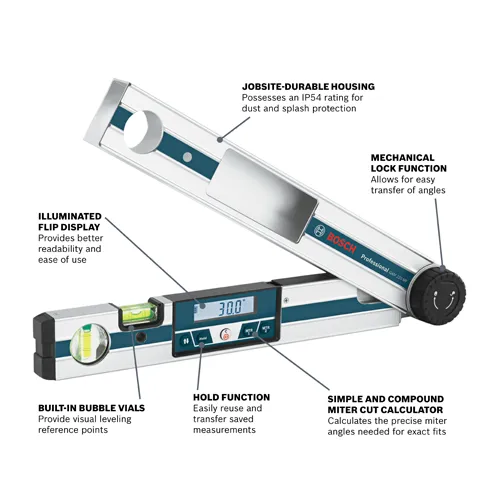
Turn on the digital protractor and look at the screen. The angle value shows clearly on the display.
| Display Element | Description |
|---|---|
| Angle Value | Shows the current angle in degrees. |
| Unit Indicator | Displays degrees (°) or radians (rad). |
| Hold Button | Locks the current measurement on screen. |
| Zero Button | Resets the protractor to zero for relative measurements. |
Recording Measurements
Keep track of your angles by writing them down or storing them digitally. Some protractors allow saving data for later use.
- Press the hold button to freeze the angle reading.
- Write the measurement on paper or in a notebook.
- Use the zero button to reset before measuring the next angle.
- For digital storage, connect to a device if your protractor supports it.
Credit: www.boschtools.com
Tips For Accurate Readings
Using a digital protractor helps measure angles quickly and precisely. To get the best results, you must follow some important tips.
This guide covers common mistakes, keeping your device steady, and dealing with tricky angles.
Avoiding Common Mistakes
Many errors happen because of simple habits. Avoid these to get accurate angle measurements every time.
- Calibrate your protractor before use.
- Make sure the surface is clean and flat.
- Do not rush the measurement process.
- Check the battery level to prevent sudden shutdowns.
- Read the display carefully and avoid parallax errors.
Maintaining Device Stability
Stable handling prevents shaky readings. Hold the protractor firmly and keep it steady during measurement.
| Tip | Reason |
|---|---|
| Use both hands to hold the device | Reduces movement and ensures steady contact |
| Place the protractor flat on the surface | Prevents tilting that can cause wrong angles |
| Avoid measuring in windy or unstable places | External forces can shift the device |
| Rest your arm on a solid surface | Improves control and reduces shaking |
Handling Complex Angles
Some angles are hard to measure due to shape or position. Use these steps to get accurate results.
- Align one edge of the protractor with one side of the angle.
- Rotate the device slowly until the second side matches the reading arm.
- Read the angle on the digital display clearly.
- If the angle is inside a tight corner, try measuring the outside angle and subtract from 180°.
- Double-check by measuring twice for tricky angles.
Troubleshooting And Maintenance
Using a digital protractor correctly helps you get precise angle measurements. Regular maintenance and quick troubleshooting can keep it working well.
This guide covers common issues and tips for battery care, cleaning, and storage to help your tool last longer.
Addressing Inaccurate Readings
If your digital protractor shows wrong angles, check for these common causes. Fixing these can improve accuracy quickly.
- Make sure the protractor is placed flat and steady on the surface.
- Calibrate the device according to the user manual before measuring.
- Check for dirt or debris on the measuring edges and clean them carefully.
- Avoid using the protractor in extreme temperatures or strong magnetic fields.
- Replace worn parts if the device has movable arms or hinges.
Battery Care And Replacement
Good battery care keeps your digital protractor working without interruption. Follow these tips to maintain battery health.
| Battery Tip | Action |
| Remove old batteries | Prevent corrosion inside the battery compartment |
| Use correct battery type | Check the manual for recommended batteries |
| Turn off after use | Save battery life |
| Store with batteries out | When not used for long periods |
| Replace batteries promptly | Avoid device shutdown during measurement |
Cleaning And Storage
Keep your digital protractor clean and store it properly. This prevents damage and ensures accurate readings.
- Use a soft, dry cloth to wipe the device after use.
- Do not use water or chemicals that might harm electronic parts.
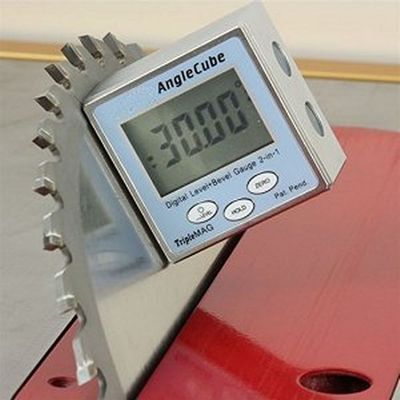
- Store the protractor in its case or a dry, dust-free place.
- Avoid placing heavy objects on top of the protractor.
- Check the device regularly for signs of wear or damage.
Credit: bigwhiterally.com
Frequently Asked Questions
How Do I Calibrate A Digital Protractor?
To calibrate, place the protractor on a flat surface. Press the zero or calibration button. This ensures accurate angle measurements every time.
Can A Digital Protractor Measure Inside Angles?
Yes, digital protractors can measure inside angles. Align the tool’s edges with the angle’s sides, then read the display for the precise measurement.
What Units Do Digital Protractors Use?
Digital protractors commonly use degrees. Some models also support radians or percentage slope. Check your device settings to switch units if needed.
How Accurate Are Digital Protractors?
Digital protractors typically offer accuracy within ±0. 1 to ±0. 2 degrees. This precision is suitable for carpentry, engineering, and DIY projects requiring exact angle measurements.
Conclusion
Measuring angles with a digital protractor is simple and precise. This tool saves time and reduces errors. Just place it on the object, read the angle, and note the result. Practice a few times to get comfortable. Using a digital protractor makes projects easier and more accurate.
Remember to keep the device calibrated for best results. Now, you can measure angles confidently for any task. Try it out and see the difference.