Are your wood edges rough and uneven? You want them smooth and clean, but sanding by hand takes forever.
What if you could finish the job faster and get professional results every time? Using a power planer might be the solution you need. You’ll discover simple steps to handle a power planer with confidence. By the end, your woodwork will look sharper, cleaner, and more polished.
Ready to transform your projects and save time? Let’s dive in and make your edges flawless.
Choosing The Right Power Planer
Using a power planer can make smoothing wood edges easier. Picking the right one is important for good results. There are different types and features to think about before buying.
This guide will help you understand the main types of power planers. It also covers key features and safety tips to keep in mind.
Types Of Power Planers
Power planers come in various styles. Each fits a different use and skill level. Choose one that suits your project needs.
- Handheld Planers:Lightweight and easy to use for small jobs.
- Benchtop Planers:Stationary and better for larger boards.
- Corded Planers:Offer continuous power but need an outlet.
- Cordless Planers:Portable and good for outdoor work but limited by battery life.
Key Features To Look For
Not all power planers are the same. Some features help you work better and safer. Check these before buying.
| Feature | Benefit |
| Adjustable Depth | Controls how much wood is removed |
| Ergonomic Handle | Makes holding the planer comfortable |
| Dust Collection | Keeps your workspace clean |
| Sharp Blades | Ensures smooth cutting |
| Speed Control | Allows different speeds for various woods |
Safety Considerations
Safety is very important when using power tools. Always follow these rules to avoid accidents.
- Wear safety glasses to protect your eyes.
- Use ear protection to avoid hearing damage.
- Keep fingers away from the blades.
- Unplug the planer when changing blades.
- Work on a stable surface to keep control.
Credit: www.sainsmart.com
Preparing Your Workspace
Before using a power planer to smooth edges, set up your workspace well. A safe and organized area helps you work better.
Good preparation reduces accidents and makes the job easier. Clear space and proper lighting are important.
Securing The Wood
Hold the wood firmly to avoid movement while planing. Use clamps or a workbench to keep it steady.
Stable wood helps you make smooth, even cuts and prevents mistakes.
- Use clamps to fix the wood on a flat surface
- Check that the wood does not wobble or slide
- Position clamps so they do not block the planer
Clearing The Area
Remove tools, dust, and other items from your workspace. This gives you room to move and work safely.
A clean area lowers the risk of tripping or knocking over things while planing.
- Take away loose tools and materials
- Sweep or vacuum dust before starting
- Keep cords and cables organized and out of the way
Setting Up Proper Lighting
Good lighting helps you see edges clearly while planing. Use bright, even light to avoid shadows.
Position lights so they shine directly on your work surface without glare.
- Use overhead lights or desk lamps
- Adjust lights to reduce shadows on edges
- Choose daylight bulbs for natural color view
Setting Up The Planer
Using a power planer correctly starts with proper setup. This helps you smooth edges safely and effectively.
Before you begin, make sure the planer is ready for the job. This includes adjusting depth, checking blades, and setting power.
Adjusting The Depth Of Cut
Set the depth of cut to control how much material the planer removes. A shallow cut is better for smooth edges.
Start with a small depth and increase it if needed. This prevents damage to the wood or planer.
- Turn the depth adjustment knob or lever
- Check the scale for the desired depth
- Test on scrap wood before starting
Checking The Blades
Sharp blades make the planer work better and safer. Dull blades can cause rough edges and strain the motor.
Inspect blades for damage or dullness before use. Replace or sharpen blades if needed.
- Turn off and unplug the planer
- Remove blade cover carefully
- Look for nicks, cracks, or dull spots
- Clean any debris from blades
- Reinstall blades securely
Power And Speed Settings
Adjust power and speed settings to match the wood type and thickness. This helps achieve smooth edges.
Lower speed is good for hard woods, higher speed works for soft woods. Use the right power to avoid burns or tear-out.
- Set speed control if your planer has one
- Choose a power setting suitable for the wood
- Test settings on scrap wood first
- Adjust as needed during use
Techniques For Smoothing Edges
Smoothing edges with a power planer makes woodwork look clean and professional. Using the right techniques helps you avoid mistakes.
This guide explains how to use a power planer safely and effectively for smooth edges.
Starting The Planer Correctly
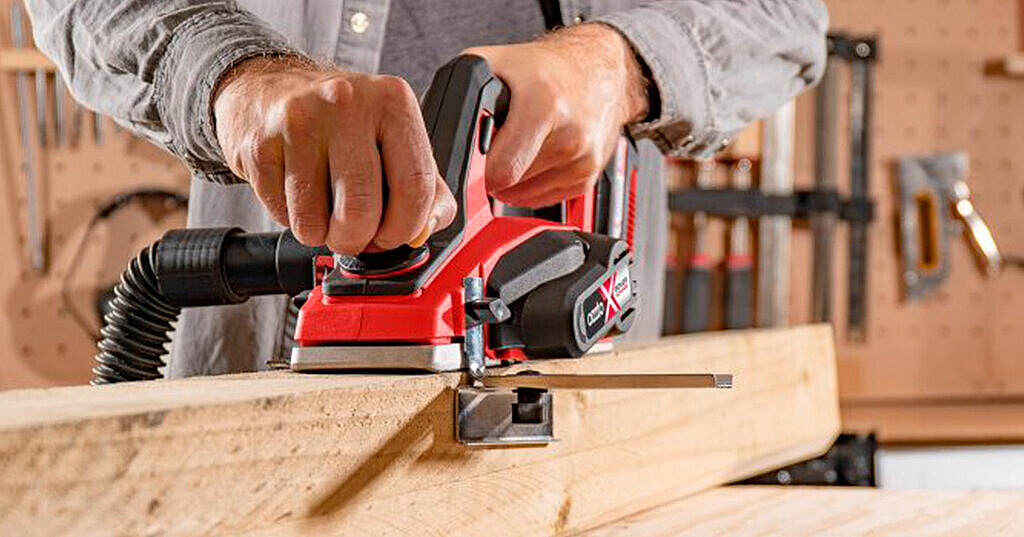
Before you begin, check that the blades are sharp and secure. Hold the planer firmly with both hands.
Place the front of the planer flat on the wood and turn it on. Let the blades reach full speed before moving forward.
Maintaining A Steady Pace
Move the planer forward at a steady, even speed. Too fast can cause rough edges, and too slow can remove too much wood.
Keep the pressure consistent and avoid stopping mid-cut to get a smooth finish.
- Use steady, even strokes
- Keep firm pressure on the planer
- Avoid pausing during the cut
Handling Corners And Curves
Slow down when you reach corners or curves. Smaller, controlled movements help follow the shape without gouging.
For tight curves, you may need to adjust the planer angle slightly or use hand tools to finish the edge.
- Reduce speed near corners
- Use gentle, controlled motions
- Switch to hand tools for tight areas
Common Mistakes To Avoid
Using a power planer can make your wood edges smooth and even. Avoiding common mistakes helps you get better results. These errors can cause damage or uneven surfaces.
Learn about the most common mistakes so you can use your power planer safely and effectively. This will save time and improve your woodworking projects.
Overcutting The Wood
Overcutting happens when you remove too much wood at once. This can ruin the shape of your project. It also makes the wood surface uneven and rough.
To avoid overcutting, take light passes with the planer. Move the tool slowly and check your progress often. This helps keep control and prevents mistakes.
Uneven Pressure Application
Pressing too hard on one side of the planer causes uneven edges. The wood will look bumpy or have dips. Uneven pressure also wears the blades faster.
Hold the planer with steady, even pressure. Keep your hands balanced on both sides. This makes the surface smooth and flat.
- Use both hands to guide the planer
- Keep the planer flat on the wood
- Do not push down too hard
Ignoring Blade Maintenance
Dull or dirty blades reduce the planer’s performance. They tear the wood fibers instead of cutting cleanly. This leads to rough edges and more effort.
Check your blades regularly. Clean and sharpen them as needed. Proper blade care ensures smooth cuts and longer tool life.
- Inspect blades before each use
- Remove pitch and resin buildup
- Sharpen or replace dull blades

Credit: www.familyhandyman.com
Finishing Touches After Planing
After using a power planer, the edges of your wood project need extra care. These finishing touches make the surface smooth and ready for use or painting.
Taking time to sand, clean, and inspect the wood ensures a better final result. Follow these steps for a clean and polished look.
Sanding The Edges
Sanding smooths out any roughness left by the planer. Use fine-grit sandpaper to gently rub the edges. This helps remove small bumps and splinters.
- Choose 120- to 220-grit sandpaper for best results.
- Sand along the grain to avoid scratches.
- Use a sanding block for even pressure.
- Wear a mask to avoid inhaling dust.
Cleaning The Surface
After sanding, clean the surface to remove dust and debris. This step prepares the wood for finishing or painting.
| Cleaning Tool | Purpose |
|---|---|
| Brush | Remove large dust particles |
| Vacuum | Clean finer dust from corners |
| Cloth | Wipe surface for final dust removal |
| Tack Cloth | Pick up remaining fine dust |
Inspecting For Flaws
Look over the edges and surface carefully. Check for dents, scratches, or uneven spots that need fixing before finishing.
- Hold the wood at different angles under good light.
- Run your hand along the edges to feel rough spots.
- Mark any flaws with a pencil for easy spotting.
- Fix small flaws by light sanding or filling gaps.
Maintaining Your Power Planer
Keeping your power planer in good shape helps it work well. Regular care makes the tool last longer.
Simple maintenance tasks can prevent damage and keep edges smooth. Learn how to care for your planer.
Regular Cleaning
Clean your power planer after each use. Dust and wood chips can block moving parts.
Use a brush or compressed air to remove debris. Wipe the surface with a dry cloth.
- Unplug the planer before cleaning
- Remove dust from vents and blades
- Keep the motor area clear of dirt
Blade Sharpening And Replacement
Dull blades make rough cuts and strain the motor. Check blades often for sharpness.
Sharpen blades using a sharpening tool or replace them if worn out. Follow the manufacturer’s instructions carefully.
- Remove blades safely with the right tools
- Sharpen edges evenly for smooth cutting
- Replace blades if they are cracked or chipped
- Tighten blade screws securely after replacement
Storage Tips
Store your power planer in a dry, clean place. Moisture can cause rust and damage parts.
Keep the planer in its case or cover it with a cloth. Avoid stacking heavy items on top of it.
- Unplug and clean before storing
- Keep blades covered to prevent damage
- Store in a place with stable temperature
- Check and oil parts if storing for a long time
Credit: www.ozito.com.au
Frequently Asked Questions
What Is A Power Planer Used For?
A power planer is used for smoothing and shaping wood surfaces. It helps in achieving flat surfaces and even edges. This tool is essential for carpenters and DIY enthusiasts aiming for precision in their woodworking projects.
How Do You Adjust A Power Planer?
Adjust a power planer by setting the cutting depth using the depth adjustment knob. Ensure the blades are sharp and properly aligned. This ensures accurate and smooth cuts on the wood surface.
Can A Power Planer Smooth Uneven Edges?
Yes, a power planer is perfect for smoothing uneven edges. It quickly removes excess material, creating a straight and smooth edge. This enhances the overall finish and precision of woodworking projects.
Is A Power Planer Easy To Use?
A power planer is easy to use with some practice. Start with adjusting the depth and guide the planer steadily over the wood. Proper handling ensures efficient and smooth results.
Conclusion
Using a power planer helps you create smooth, clean edges fast. Always hold the tool steady and move it evenly along the wood. Take your time and check your work often. Safety matters—wear eye protection and follow instructions. Practice makes perfect, so try on scrap wood first.
With care and patience, your edges will look neat and professional. Keep your power planer sharp and clean for the best results. Enjoy making your woodworking projects look great with smooth edges.