
Are you tired of your trusty rotary tool breaking down just when you need it the most? You’re not alone.
Many tool enthusiasts and DIY lovers face this frustrating issue. But here’s the good news: repairing your rotary tool is easier than you might think. Imagine saving money, avoiding the hassle of buying a new tool, and feeling the satisfaction of fixing it yourself.
This guide will walk you through the essential steps to breathe new life into your rotary tool. By the end of this article, you’ll have the confidence and know-how to tackle any rotary tool repair with ease. Get ready to become the master of your tools and never let a broken rotary tool slow you down again!
Common Rotary Tool Issues
Rotary tools are handy for many jobs. They can cut, grind, and polish. Sometimes, they stop working right. Knowing common problems helps you fix them fast.
This guide covers four common issues. Learn what causes them and how to check your tool.
Power Problems
Your rotary tool may not start or lose power. This can be due to simple causes. Check the power cord for cuts or breaks. A loose plug can stop power flow.
- Inspect the power cord for damage
- Make sure the plug fits tight in the socket
- Check if the power switch works properly
- Test the fuse or circuit breaker at home
Unusual Noises
Strange sounds may mean a problem inside the tool. Grinding or rattling noises can show worn bearings or loose parts. A high-pitched whine might mean motor strain.
Listen carefully while the tool runs. Try these checks:
- Look for loose screws or covers
- Check the motor brush for wear
- See if the bit spins freely
- Make sure no debris is inside the tool
Overheating
Rotary tools get warm with use. Too much heat causes damage. Overheating happens if vents are blocked or if you use the tool too long without rest.
| Cause | Effect | Fix |
| Blocked air vents | Heat builds inside | Clean vents regularly |
| Long continuous use | Motor overheats | Take breaks often |
| Old motor brushes | Poor motor cooling | Replace brushes |
Speed Fluctuations
Speed changes during use can hurt your project. A rotary tool may slow down or speed up without your control. This often means a problem with the speed control dial or the power supply.
To fix speed issues:
- Check if the speed dial turns smoothly
- Clean any dirt around the dial
- Inspect the power cord for loose connections
- Test the tool on a different power outlet
- Replace worn internal parts if needed

Credit: www.youtube.com
Essential Tools For Repairs
Fixing rotary tools needs the right set of tools. Having these helps you work safely and well.
This guide covers key tools like screwdrivers, pliers, multimeters, and lubricants. Each one plays a big role.
Screwdrivers And Pliers
Screwdrivers help open and close the tool’s casing. Pliers grab small parts or wires firmly.
Use screwdrivers with different heads like flat or Phillips for various screws. Pliers come in needle-nose and cutting types.
- Flathead screwdriver for straight slot screws
- Phillips screwdriver for cross-shaped screws
- Needle-nose pliers for tight spaces
- Cutting pliers to trim wires
Multimeter Usage
A multimeter tests electrical parts in your rotary tool. It checks voltage, current, and resistance.
Using a multimeter helps find broken wires or faulty switches quickly. Set it to the right mode before testing.
- Measure voltage to check battery or power supply
- Test continuity to find broken connections
- Check resistance to assess motor coils
Lubricants And Cleaners
Lubricants keep moving parts smooth and prevent wear. Cleaners remove dust and dirt from inside the tool.
Use light oil or grease on gears and bearings. Use compressed air or soft brushes to clean parts without damage.
- Light machine oil for smooth gear movement
- Grease for heavy load parts
- Compressed air to blow out dust
- Soft brushes for delicate cleaning
Fixing Power Failures
Rotary tools may stop working due to power issues. Finding the cause is the first step to fix them. This guide shows how to check key parts that affect power.
Look carefully at the power cord, switch, and motor. Each part can cause the tool to lose power. Follow these checks to get your tool running again.
Checking The Power Cord
Start by examining the power cord for damage. A broken cord can stop the tool from getting electricity.
- Look for cuts, cracks, or worn spots on the cord.
- Check the plug for bent or broken prongs.
- Make sure the cord fits tightly in the tool and outlet.
- A loose or damaged cord needs repair or replacement.
Inspecting The Switch
The switch controls the power flow to the motor. A faulty switch can cause power failure.
| Switch Issue | Symptom | Action |
| Dirty contacts | Tool won’t start | Clean contacts with electrical cleaner |
| Broken switch | No response when pressed | Replace the switch |
| Loose wiring | Intermittent power | Tighten or resolder connections |
Testing The Motor
The motor moves the rotary tool. If the motor fails, power problems follow. Test the motor carefully.
- Unplug the tool before testing.
- Use a multimeter to check motor winding resistance.
- Compare resistance to the tool’s manual specs.
- Look for burnt smells or visible damage.
- Replace the motor if it shows signs of failure.
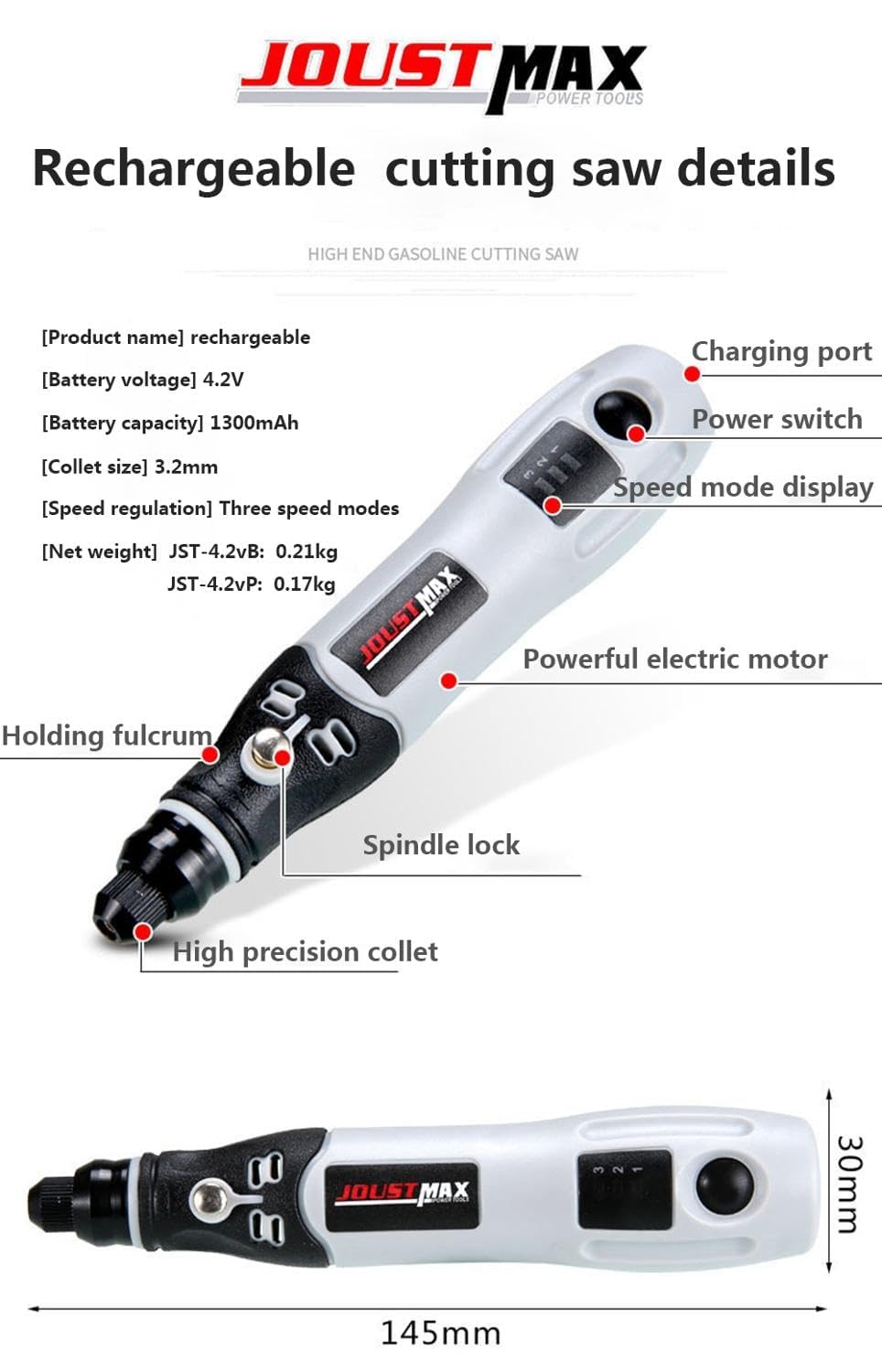
Credit: www.amazon.ca
Resolving Noise And Vibration
Rotary tools can make noise and vibrate when parts wear out or become unbalanced. Fixing these issues can improve tool performance and comfort. This guide covers two key areas to reduce noise and vibration.
Understanding how to replace bearings and balance attachments helps keep your rotary tool running smoothly. Follow these tips to fix common problems.
Bearing Replacement
Worn bearings cause grinding sounds and strong vibrations. Replacing them can quiet your rotary tool. First, unplug the tool and remove the outer casing.
- Locate the bearings near the motor shaft.
- Use a bearing puller or carefully tap them out with a small hammer.
- Clean the shaft and housing before installing new bearings.
- Press the new bearings in place evenly to avoid damage.
- Reassemble the tool and test for noise and vibration.
Balancing Attachments
Unbalanced attachments cause wobbling and loud vibrations. Balancing them improves control and reduces wear. Use these tips to check and fix balance issues.
| Action | Description | Tools Needed |
| Inspect Attachments | Look for cracks or bent parts causing imbalance. | Flashlight, magnifying glass |
| Clean Attachments | Remove dirt and debris that add weight unevenly. | Brush, cloth |
| Test Balance | Spin attachments slowly by hand; feel for wobble. | Hands |
| Adjust Weight | Add small tape pieces or file down heavy spots. | Tape, file |
| Reinstall and Test | Attach to the tool and check for vibration reduction. | Rotary tool |
Managing Overheating Issues
Rotary tools can overheat during use. Overheating may cause damage or reduce tool life.
Fixing overheating problems helps keep your tool working well and safe.
Cleaning Air Vents
Air vents allow cool air to flow through the tool. Dust and debris can block these vents.
- Turn off and unplug the tool before cleaning.
- Use compressed air to blow out dust from vents.
- Use a small brush to remove stuck dirt.
- Check vents regularly to prevent buildup.
Replacing Brushes
Brushes help transfer electricity inside the tool. Worn brushes cause overheating.
| Brush Condition | Effect on Tool | Action Needed |
| Good | Normal operation | No change |
| Worn down | Overheating risk | Replace brushes |
| Damaged | Tool stops working | Replace immediately |
Improving Ventilation
Good airflow keeps the tool cool. Poor ventilation causes heat build-up.
Tips to improve ventilation:
- Use the tool in open spaces, not enclosed areas.
- Avoid covering the tool while running.
- Take breaks to let the tool cool down.
- Keep fans or air conditioners on during long use.
Adjusting Speed And Performance
Rotary tools need the right speed to work well. Adjusting speed helps get smooth cuts and better results. You can fix the speed control and keep the tool running strong.
Good performance also comes from keeping parts clean and moving freely. Lubricating the tool stops wear and keeps it working longer. Let’s look at how to do these tasks.
Calibrating Speed Control
Check the speed dial or switch for accuracy. If the tool runs too fast or slow, you may need to adjust the control inside. A small screwdriver can help with this task.
- Unplug the rotary tool to stay safe.
- Open the speed control knob cover carefully.
- Locate the small adjustment screw inside.
- Turn the screw gently to increase or decrease speed.
- Close the cover and test the tool speed again.
Lubricating Moving Parts
Lubrication reduces friction and heat in moving parts. Use light machine oil or grease made for tools. Avoid over-oiling to keep dust away.
| Part | Type of Lubricant | Frequency |
| Bearings | Light machine oil | Every 3 months |
| Spindle | Grease | Every 6 months |
| Gears | Grease | Every 6 months |
Preventative Maintenance Tips
Rotary tools need care to work well for a long time. Regular maintenance stops problems early.
Simple habits keep your tool safe and ready to use. Follow these tips to avoid costly repairs.
Regular Cleaning
Clean your rotary tool after each use. Dust and debris can block moving parts and cause wear.
Use a soft brush or compressed air to remove dirt. Wipe the tool with a dry cloth to keep it clean.
- Remove dust from vents and motor housing
- Keep the tool free of grease and grime
- Clean attachments and accessories too
Proper Storage
Store your rotary tool in a dry, cool place. Avoid damp or hot areas that can damage parts.
Use a case or box to protect the tool from dust and drops. Keep cords untangled to stop breaks.
- Keep the tool away from direct sunlight
- Store accessories together to avoid loss
- Place the tool where it won’t fall or get crushed
Routine Inspections
Check your rotary tool regularly for signs of damage. Look at the cord, switches, and attachments.
Fix small problems before they grow. Tighten loose parts and replace worn pieces to keep the tool safe.
- Inspect the power cord for cuts or frays
- Test the on/off switch for proper function
- Examine attachments for wear or damage
- Listen for strange noises while running

Credit: www.youtube.com
Frequently Asked Questions
How Do I Fix A Rotary Tool That Won’t Start?
Check the power source and switch first. Inspect the cord for damage. Replace worn brushes if needed. Clean debris inside the tool for better connectivity.
What Causes A Rotary Tool To Overheat Quickly?
Overheating often results from prolonged use without breaks. Poor ventilation or clogged air vents can also cause heat buildup. Clean vents regularly and allow the tool to cool down.
How Can I Replace Rotary Tool Brushes Safely?
Unplug the tool before starting. Locate the brush caps near the motor. Remove old brushes gently and insert new ones. Ensure proper brush fit to maintain performance.
Why Is My Rotary Tool Making Unusual Noises?
Unusual noises may indicate worn bearings or loose parts. Check for debris inside the tool. Tighten any loose screws. Replace faulty components promptly to avoid further damage.
Conclusion
Repairing rotary tools saves money and extends tool life. Regular checks keep tools working well and safe. Follow simple steps for quick fixes at home. Keep parts clean and replace worn pieces on time. Small repairs prevent bigger problems later on.
Stay patient and careful during each repair task. Practice helps you fix tools more easily. Use these tips to keep your rotary tools ready. A little effort goes a long way in repairs. Keep your tools strong and ready for any job.