Your cordless drill works hard for you, so keeping it in top shape is key. One part you might overlook is the vents, but they play a big role in how well your drill runs.
When dust and debris clog these vents, your drill can overheat and wear out faster. In this guide, you’ll learn simple and effective ways to clean your cordless drill vents, helping your tool last longer and work better. Keep reading to discover easy tips that save you time and money.
Why Clean Drill Vents
Cordless drills have vents that let air flow through the motor. These vents stop the drill from getting too hot. Dirt and dust can block these vents over time.
Cleaning the vents keeps the drill working well and lasts longer. It is a simple step to protect your tool.
Impact On Performance
Dirty vents reduce airflow inside the drill. This makes the motor work harder than usual. When the motor struggles, the drill loses power.
Cleaning the vents helps the motor run smoothly. The drill keeps its strength and speed for longer jobs.
Preventing Overheating
Blocked vents trap heat inside the drill. Overheating can damage the motor parts. It also shortens the battery life.
Cleaning vents lets heat escape easily. This stops the drill from getting too hot and breaking down.

Credit: www.gz-supplies.com
Tools Needed
Cleaning cordless drill vents is important to keep the drill working well. Dust and debris can block vents and cause overheating.
Using the right tools makes the cleaning safe and effective. Below are the basic cleaning supplies and special brushes and air blowers you need.
Basic Cleaning Supplies
Start with simple supplies to remove dirt from the drill vents. These help you clean without damaging the tool.
- Soft cloth to wipe surfaces
- Mild soap and water for light cleaning
- Isopropyl alcohol to remove grease
- Cotton swabs for small spaces
- Compressed air cans to blow out loose dust
Recommended Brushes And Air Blowers
Using the right brushes and air blowers keeps the vents clear without damage. Choose tools that fit well and reach inside the vents.
| Tool | Purpose |
| Small nylon brush | Remove dust inside vents gently |
| Soft-bristle paintbrush | Clean larger vent areas |
| Electric air blower | Blow out stubborn debris |
| Compressed air can | Remove loose dirt quickly |
| Needle brush | Clean narrow vent slots |
Step-by-step Cleaning Process
Cleaning the vents of your cordless drill helps keep it cool and working well. Dust and debris can block airflow and cause overheating.
This guide shows you how to clean the vents safely and effectively in a few simple steps.
Unplug And Remove Battery
Always start by unplugging the drill from any power source. Then, remove the battery to avoid accidents during cleaning.
Clear Surface Dust
Wipe the outside of the drill to remove loose dust. Use a dry cloth or a soft brush for this task.
- Hold the drill firmly
- Use a soft brush to clean vents and crevices
- Wipe the surface with a dry cloth
- Do not use water or liquid cleaners
Clean Inside The Vents
Remove dust stuck inside the vents carefully. Use compressed air or a small brush to reach inside.
| Tool | Use | Tip |
| Compressed air | Blow out dust | Hold can upright and spray in short bursts |
| Small brush | Brush away dirt | Use gentle strokes to avoid damage |
| Vacuum cleaner | Remove loosened dust | Use a narrow nozzle attachment |
Dry And Reassemble
Let the drill dry completely if any moisture is present. Then, reinsert the battery and check if the vents are clean.

Credit: www.amazon.ca
Maintenance Frequency
Cleaning cordless drill vents helps keep the tool cool. Dust and debris block airflow and cause overheating.
Regular maintenance extends the drill’s life and improves performance. Knowing when to clean is important.
Signs Your Drill Needs Cleaning
Look for warning signs that show your drill vents are dirty. These signs mean you should clean the vents soon.
- The drill gets hot quickly during use
- Motor sounds louder or works harder than usual
- Reduced power or slower drilling speed
- Visible dust or debris around vents
- Unusual smells like burning plastic
Routine Cleaning Schedule
Clean the vents regularly to avoid damage. The schedule depends on how often and where you use the drill.
If you use the drill daily or in dusty places, clean the vents once a week. For light use, clean monthly.
- Heavy use (daily or dusty sites): clean every week
- Moderate use (a few times a week): clean every two weeks
- Light use (once a week or less): clean once a month
Common Mistakes To Avoid
Cleaning cordless drill vents is important to keep the tool working well. Many people make simple mistakes that can cause damage. Avoiding these errors will help your drill last longer.
Two common mistakes are using too much moisture and ignoring safety rules. Each can harm your drill or cause injury. Learn how to avoid these problems below.
Using Excessive Moisture
Many think water cleans better, but too much moisture can hurt the drill. Water can get inside vents and damage the motor or electrical parts.
- Do not spray water directly on vents
- Avoid soaking the drill or using wet cloths
- Use a dry brush or compressed air to remove dust
- If needed, lightly dampen a cloth for surface cleaning only
Ignoring Safety Precautions
Cleaning cordless drills without safety steps can cause injury or damage. Always follow safety guidelines to protect yourself and the tool.
| Safety Tip | Reason |
| Remove the battery before cleaning | Prevents accidental starts and electric shock |
| Wear safety glasses | Protects eyes from dust and debris |
| Work in a well-lit area | Helps see vents clearly and avoid mistakes |
| Use tools as directed by the manual | Prevents damage and maintains warranty |
Extending Drill Lifespan
Cleaning cordless drill vents helps keep the tool working well. Dust and debris can block airflow. This causes the drill to get too hot and wear out faster.
Regular care extends the drill’s life. Proper storage and inspection also protect the vents. These simple steps save money on repairs and replacements.
Proper Storage Tips
Storing your drill correctly stops dust from entering vents. It also prevents damage from falls or moisture. Keep your drill safe with these tips.
- Store the drill in its case after use
- Keep the drill in a dry, cool place
- Avoid leaving the drill in direct sunlight
- Do not place heavy items on top of the drill
- Charge the battery before long storage periods
Regular Inspection Benefits
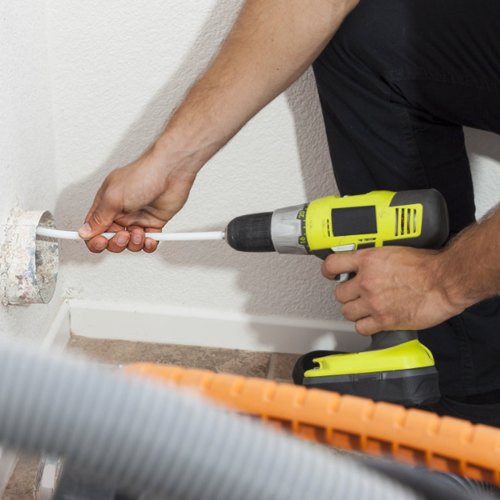
Checking your drill often helps spot problems early. Look for dust buildup and vent blockages. Clean vents keep air flowing and the drill cool.
| Inspection Task | Reason |
| Check vents for dust | Prevents overheating |
| Look for cracks or damage | Avoids tool failure |
| Test drill operation | Ensures smooth use |
| Clean vents with compressed air | Removes debris |
Credit: www.vevor.ca
Frequently Asked Questions
How Often Should I Clean Cordless Drill Vents?
You should clean cordless drill vents every 3 to 6 months. Frequent use in dusty areas requires more regular cleaning. This prevents overheating and extends the drill’s lifespan. Regular maintenance keeps the motor running smoothly and ensures optimal performance.
What Tools Are Best For Cleaning Drill Vents?
Use a soft brush, compressed air, or a vacuum cleaner. Avoid sharp objects that can damage the vent grille. These tools effectively remove dust and debris. Proper tools ensure safe and thorough cleaning without harming the drill.
Can Clogged Vents Cause Drill Overheating?
Yes, clogged vents restrict airflow, causing the drill to overheat. Overheating can damage internal components and reduce battery life. Keeping vents clean helps maintain proper ventilation and prevents performance issues.
Is It Safe To Use Compressed Air On Drill Vents?
Yes, using compressed air is safe if done gently. Hold the can upright and spray short bursts to avoid moisture build-up. This method effectively removes dust without opening the drill casing.
Conclusion
Cleaning cordless drill vents keeps your tool running smoothly. Dust and debris can block airflow and cause overheating. Regular cleaning helps avoid damage and extends battery life. Use a soft brush or compressed air for best results. Take care during cleaning to protect delicate parts.
Small steps make a big difference in tool performance. Keep your drill vents clean for safer, longer use. Simple care prevents costly repairs down the road. A little effort now saves frustration later.