If you want your projects to look sharp and professional, mastering the combination square is a must. This simple tool can help you make precise measurements and perfect angles every time.
Whether you’re cutting wood, marking metal, or checking corners, using a combination square correctly saves you time and frustration. In this guide, you’ll discover easy steps to use your combination square like a pro. By the end, you’ll feel confident tackling any layout task with accuracy and ease.
Ready to take your skills up a notch? Let’s dive in.
Choosing The Right Combination Square
A combination square is a useful tool for accurate layout work. It helps measure and mark right angles and depths. Choosing the right one can make your tasks easier and more precise.
This guide explains important features to consider. You will learn about types, materials, and sizes to help you pick the best tool for your needs.
Types And Features
There are several types of combination squares. Each has features suited for different jobs. Knowing these helps you select the right tool.
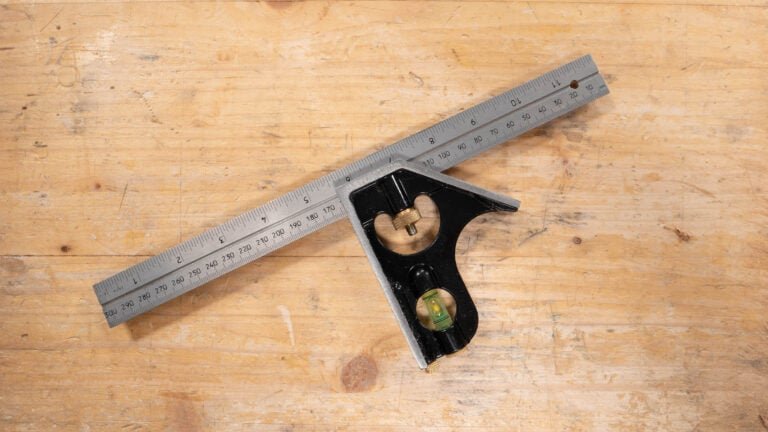
- Standard Combination Square:Includes a ruler, a 90-degree head, and a center-finding head.
- Engineer’s Square:Made for metalwork with a fixed blade and solid head.
- Carpenter’s Square:Larger and good for framing and woodworking tasks.
- Adjustable Square:Allows angle changes beyond 90 degrees for versatile use.
Materials And Build Quality
Material affects durability and accuracy. Good build quality helps the tool last longer and stay true.
| Material | Benefits | Drawbacks |
|---|---|---|
| Stainless Steel | Rust-resistant, strong, and accurate. | Usually more expensive. |
| Carbon Steel | Strong and less costly. | Can rust if not cared for. |
| Aluminum | Lightweight and easy to handle. | Less durable and can bend. |
| Plastic | Very light and cheap. | Not very accurate or durable. |
Size Considerations
Size affects how you use the square. Larger squares help with big projects. Smaller ones fit tight spaces.
- Ruler Length:Common sizes are 6, 12, and 18 inches.
- Blade Width:Wider blades are more stable but less flexible.
- Marking Range:Choose based on the size of your workpieces.
Key Parts Of A Combination Square
A combination square is a tool for measuring and marking. It helps you make straight and accurate lines.
Understanding its parts will help you use it well. Each part has a special job for layout tasks.
Blade And Ruler
The blade is the long, flat part of the tool. It usually has measurements in inches and centimeters.
You slide the blade through the handle to measure or mark wood and other materials. The ruler helps you get exact lengths.
- Made of steel for durability
- Marked with clear measurement lines
- Can be locked in place for steady use
Stock And Handle
The stock, or handle, is the thick part where the blade fits in. It is usually at a right angle to the blade.
This part helps you draw perfect 90-degree lines and check corners. It also provides a grip when measuring.
- Made from metal or wood
- Holds the blade at a right angle
- Has a locking screw to fix the blade
Bubble Level And Scriber
The bubble level is a small glass tube filled with liquid. It helps check if surfaces are level or plumb.
The scriber is a sharp point stored in the handle. You use it to mark lines on wood or metal for cutting or drilling.
- Bubble level ensures horizontal or vertical accuracy
- Scriber marks precise layout lines
- Both parts add extra functions to the tool
Setting Up Your Combination Square
Setting up your combination square correctly is key for accurate measurements. This guide will help you prepare your tool for precise layout work.
Follow these simple steps to ensure your combination square is ready for use. Proper setup saves time and reduces mistakes.
Calibrating The Blade
Calibration means making sure the blade is straight and true. Check the blade against a known square surface.
If the blade is not aligned, loosen the locking screw and adjust it. Tighten the screw once the blade is straight.
Adjusting The Stock
The stock is the thick part that slides on the blade. Make sure it moves smoothly and locks firmly.
Slide the stock to the desired position and tighten the locking mechanism. This keeps the blade stable during use.
Checking Accuracy
Double-check your square’s accuracy before starting your project. Use a flat surface or a known accurate square.
- Place the combination square against the surface.
- Mark a line along the blade.
- Flip the square and mark again from the same edge.
- If the lines match, your tool is accurate.
- If not, adjust the blade or stock as needed.

Credit: www.wikihow.com
Measuring And Marking Techniques
A combination square is a handy tool for accurate measuring and marking. It helps you draw straight lines, check angles, and measure depth easily.
Using the right techniques ensures your work is precise and neat. This guide covers key ways to use the combination square effectively.
Marking Straight Lines
Place the ruler of the combination square against the edge of your workpiece. Use the head to keep it firmly in place. Draw your line along the ruler for a straight mark.
Make sure the ruler is tight and does not move. This prevents wavy or uneven lines on your material.
Measuring Depth And Height
Use the combination square’s ruler to measure depth by extending the ruler into a hole or slot. Read the measurement where the head touches the surface.
For height, stand the square on a flat surface. Adjust the ruler until it reaches the top point you want to measure. Check the ruler scale for accuracy.
- Extend ruler into the space
- Keep the head flat on the surface
- Read measurement at the head edge
Checking Angles
The combination square can check 90-degree and 45-degree angles. Place the head against one edge and the ruler along the other edge.
If the ruler lies flat without gaps, the angle is correct. This helps ensure corners and joints fit properly.
- Use the head for stable contact
- Align ruler with second edge
- Look for gaps or misalignment
Using The Square For Layout Tasks
A combination square is a handy tool for many layout jobs. It helps you mark straight lines and measure angles with ease.
Using the square correctly can save time and improve the accuracy of your work. It is useful for woodworking, metalworking, and other crafts.
Squaring Edges And Corners
Squaring edges means making sure two surfaces meet at a perfect 90-degree angle. This is important for making strong joints and neat assemblies.
Place the combination square’s stock firmly against one edge. Then, use the ruler to draw a line on the other surface. This line will be exactly square to the first edge.
- Hold the stock tight against the edge
- Slide the ruler out to the needed length
- Draw a clear line along the ruler’s edge
- Check the line with the square before cutting
Transferring Measurements
You can use the combination square to copy measurements from one piece to another. This helps keep parts the same size and shape.
Adjust the ruler to the measurement you need. Lock it in place using the square’s screw. Then, use the ruler to mark the same length on your workpiece.
- Loosen the screw to move the ruler
- Set the ruler to the desired measurement
- Tighten the screw to hold the ruler steady
- Mark the measurement on the material
Creating Angled Cuts
The combination square can help you mark angles other than 90 degrees. It usually has a 45-degree edge for making angled cuts.
Place the stock against the edge of your workpiece. Use the 45-degree side of the ruler to draw a line for angled cuts like bevels or chamfers.
- Position the stock square to the edge
- Use the angled ruler side to mark the cut
- Check your line before cutting
- Cut along the marked angle carefully

Credit: www.familyhandyman.com
Maintenance And Care Tips
Taking care of your combination square helps it stay accurate for a long time. Proper maintenance makes your tool work better and last longer.
Simple care steps keep your combination square clean and precise. Follow these tips to avoid damage and keep your tool ready to use.
Cleaning And Storage
Clean your combination square after each use. Remove dirt, dust, and metal shavings that can cause wear.
Store the tool in a dry place to prevent rust. Use a case or toolbox to protect it from damage.
- Wipe with a dry cloth to remove debris
- Use light oil to protect metal parts from rust
- Keep in a closed container or case
- Avoid damp or humid storage areas
Avoiding Common Damage
Handle your combination square with care to prevent bending or breaking. Dropping it can harm the blade or head.
Do not use the square as a hammer or pry bar. Use the right tool for each job to keep the square accurate.
- Hold the tool firmly during use
- Do not force the blade beyond its limit
- Avoid dropping or throwing the square
- Use it only for measuring and marking
Regular Calibration
Check your combination square’s accuracy regularly. Calibration keeps your measurements precise.
Use a known straight edge or try a test cut to verify the square’s angles. Adjust the tool if needed.
- Test the 90-degree angle against a straight edge
- Check the 45-degree angle with a miter gauge or protractor
- Adjust the blade tightness to fix loose parts
- Replace worn parts if calibration is off
Troubleshooting Common Issues
Using a combination square correctly helps ensure accurate measurements. Sometimes, problems arise that affect its performance.
Identifying and fixing these issues will keep your tool reliable for layout tasks.
Blade Slippage
Blade slippage happens when the ruler moves inside the handle during use. This leads to mistakes in marking or measuring.
- Check if the locking screw is tight enough.
- Clean any dirt or dust inside the handle and on the blade.
- Replace the locking screw if it is worn or damaged.
- Use gentle pressure when measuring to avoid shifting.
Inaccurate Readings
Inaccurate readings occur when the blade or handle is bent or not aligned properly. This causes wrong angles or measurements.
| Cause | Fix |
| Bent blade | Replace the blade or straighten carefully |
| Misaligned handle | Adjust the handle to sit square with the blade |
| Worn measuring marks | Use a new blade or mark measurements manually |
Worn Components
Worn parts reduce the tool’s accuracy and ease of use. Regular checks can catch wear early.
- Loose or stripped locking screw
- Blade edge with chips or dents
- Handle that does not hold the blade firmly
- Rust or corrosion on metal parts
Advanced Tips From Experts
Using a combination square well can improve your layout work greatly. Experts share tips to help you get precise measurements and save time.
This guide covers ways to combine tools, customize your square, and work more efficiently on projects.
Combining Tools For Precision
Pair your combination square with other tools to increase accuracy. Using the right set of tools helps avoid mistakes and speeds up your work.
- Use a marking knife along with the square for fine lines
- Combine the square with a dial caliper to check thickness
- Use a bevel gauge to transfer angles before measuring
- Pair the square with a laser level for straight reference lines
Customizing Your Square
Making small changes to your combination square can improve its function for your needs. Personalizing your tool saves time and reduces errors.
| Customization | Benefit |
| Adding a fine-point pencil holder | Marks thin, precise lines |
| Fitting a magnetic base | Keeps square stable on metal surfaces |
| Replacing the blade with a stainless steel one | Improves durability and straightness |
| Adding a small bubble level | Helps check level surfaces quickly |
Efficient Workflow Techniques
Work smart to speed up your layout tasks. Organizing steps and keeping tools ready helps you finish faster and with better accuracy.
- Prepare all tools before starting to avoid interruptions
- Mark and measure twice to confirm accuracy
- Use clamps to hold workpieces steady during marking
- Keep the combination square blade clean and free of debris
- Store your square in a protective case to avoid damage

Credit: www.youtube.com
Frequently Asked Questions
What Is A Combination Square Used For In Layout Work?
A combination square helps measure and mark 90° and 45° angles accurately. It also checks flatness and depth. This tool improves precision in woodworking and metalworking layouts. It ensures consistent measurements and straight lines.
How Do You Adjust A Combination Square For Accuracy?
Loosen the locking nut, slide the ruler to desired length, then tighten the nut. Check the square against a known right angle to confirm accuracy. Adjust if needed. Proper calibration ensures precise layout measurements.
Can A Combination Square Measure Depth And Height?
Yes, the combination square can measure depth, height, and internal angles. The ruler slides through the head, allowing depth checks. This versatility makes it essential for various layout and inspection tasks.
Why Is A Combination Square Better Than A Regular Ruler?
A combination square offers angle measurements and marking guides, unlike a plain ruler. It ensures accurate 90° and 45° lines and depth measurement. This makes it more versatile and precise for layout work.
Conclusion
A combination square is a handy tool for precise layouts. It simplifies measuring and marking tasks. Use it for straight edges and perfect angles. Its versatility benefits woodworkers and metalworkers alike. Practice using it regularly to improve accuracy. Mistakes become rare with familiar use.
Always keep it clean and stored properly. A well-maintained tool lasts longer. Invest time in mastering basic techniques. This ensures efficient and accurate results in projects. Enjoy the satisfaction of precise work.