Are you ready to take your woodworking skills to the next level? Mastering the combination square is one of the best ways to ensure your cuts and measurements are spot on every time.
Whether you’re building furniture, crafting shelves, or working on any project, this simple tool can become your secret weapon. In this guide, you’ll discover how to use a combination square like a pro, avoid common mistakes, and make your woodworking projects cleaner, faster, and more precise.
Keep reading—you’ll wonder how you ever worked without it!

Credit: www.axminstertools.com
Choosing The Right Combination Square
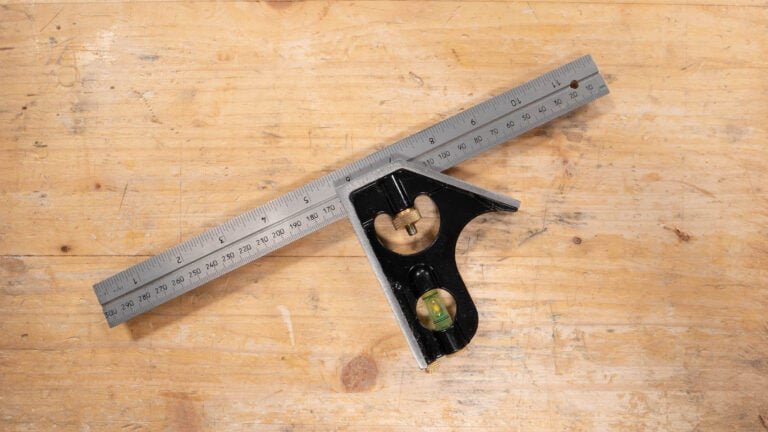
A combination square is a key tool for woodworking. It helps you measure, mark, and check angles. Choosing the right one makes your work easier and more accurate.
There are many types and features to consider. This guide covers the main points to help you pick the best combination square for your needs.
Types Of Combination Squares
Combination squares come in different styles. Each type offers specific uses and benefits for woodworking tasks.
- Standard Combination Square:Includes a ruler, a 90-degree head, and a 45-degree miter head. Good for most woodworking jobs.
- Double Square:Has two 90-degree heads for more precise measurements and marking.
- Center Square:Designed to find the center of round objects like dowels or pipes.
- Digital Combination Square:Features a digital display for easy reading of measurements.
Key Features To Look For
Some features make a combination square more useful and durable. Check for these to get a reliable tool.
- Clear Markings:The ruler should have easy-to-read numbers and lines.
- Adjustable Head:The head should slide smoothly and lock firmly in place.
- Magnetic Base:A magnetic head helps hold the square on metal surfaces.
- Locking Mechanism:Strong locks keep the ruler from moving during use.
- Multiple Angle Heads:Extra heads add versatility for different angle measurements.
Materials And Build Quality
The materials used affect the tool’s durability and accuracy. Good quality tools last longer and work better.
| Material | Benefits | Drawbacks |
| Stainless Steel | Strong, rust-resistant, precise | Heavier, more expensive |
| Aluminum | Lightweight, affordable, rust-resistant | Less durable, can bend |
| Plastic | Cheap, lightweight | Not durable, less accurate |
Setting Up Your Combination Square
A combination square is a useful tool for woodworking. It helps measure and mark straight lines and angles.
Setting it up correctly is important for precise work. This guide shows you how to adjust the blade, lock it, and check its accuracy.
Adjusting The Blade
To adjust the blade, slide it along the ruler to the desired length. Make sure the blade lines up with your measurement mark.
- Hold the ruler steady with one hand.
- Move the blade smoothly to avoid damage.
- Check the alignment against a straight edge.
- Set the blade just past the mark for a snug fit.
Locking Mechanism Tips
The locking mechanism keeps the blade in place during use. Tighten it just enough to hold the blade firmly.
| Lock Type | How to Tighten | Tip |
| Thumb Screw | Turn clockwise | Use fingers, not tools |
| Knurled Nut | Rotate until firm | Don’t over-tighten |
| Lever Lock | Flip lever down | Check blade does not slip |
Calibrating For Accuracy
Calibration ensures your combination square gives correct readings. Test it by checking a known right angle.
- Place the square’s blade against a straight edge.
- Set the ruler flush with the edge.
- Check if the blade and ruler form a perfect 90-degree angle.
- If not, adjust the blade and repeat the test.
- Once correct, lock the blade securely.
Basic Measurements With A Combination Square
The combination square is a useful tool for woodworking. It helps you measure and mark wood accurately. This guide explains how to use it for basic tasks.
Knowing how to measure length, mark angles, and check flatness will improve your woodworking projects. Follow these simple steps to get precise results.
Measuring Length And Depth
Use the combination square ruler to measure length and depth of wood pieces. Slide the ruler to the needed size and lock it in place. Then, read the scale for your measurement.
- Place the ruler along the edge of the wood.
- Adjust the head to the desired measurement.
- Lock the head to keep the ruler steady.
- Mark the wood at the ruler’s edge.
- For depth, insert the ruler into holes or slots and note the measurement.
Marking 90-degree Angles
The combination square helps mark perfect 90-degree angles. Align the head against the wood edge and draw a line along the ruler. This ensures a straight, square line.
| Angle Type | How to Mark |
|---|---|
| 90 Degrees | Place the square head flush on the edge, draw along the ruler |
| 45 Degrees | Use the angled side of the square head, align and mark |
Checking Flatness And Straightness
To check flatness, lay the square flat on the wood surface. Look for gaps between the wood and the ruler edge. For straightness, slide the ruler along the edge and watch for uneven spots.
- Place the ruler flat on the surface.
- Check for gaps or rocking motion.
- Slide the ruler along edges to test straightness.
- Mark any uneven areas for correction.

Credit: www.amazon.ca
Advanced Techniques In Woodworking
Using a combination square improves your woodworking accuracy. It helps you measure, mark, and check angles with ease.
This guide covers advanced ways to use a combination square for better results in your projects.
Marking 45-degree Angles
The combination square has a 45-degree edge for marking angles. Use this to create perfect miter joints or angled cuts.
Place the square’s body flat against the wood edge. Draw along the angled edge to mark the 45-degree line.
- Align the stock firmly to avoid slipping
- Use a sharp pencil for clear marks
- Double-check the angle with a protractor if needed
Transferring Measurements
Transfer measurements from one piece of wood to another with the combination square. This keeps parts consistent.
Set the ruler to the needed length. Tighten the lock to hold it in place. Use the ruler edge to mark the wood.
- Check that the ruler is secure before marking
- Use the same setting to mark multiple pieces
- Mark lightly at first to avoid mistakes
Using The Square For Layouts
The combination square helps lay out cuts and joints quickly. It is useful for marking lines parallel or perpendicular to edges.
Use the ruler to set distances from the edge. Draw lines using the head as a guide for 90 degrees. This speeds up your work.
- Use the square’s head for perfect right angles
- Mark multiple parallel lines by adjusting the ruler
- Check your layout lines before cutting
Maintaining And Caring For Your Tool
Keeping your combination square clean and well cared for helps it last longer. Proper maintenance also ensures accurate measurements each time you use it.
Follow simple care steps to protect your tool from damage and wear. This guide covers cleaning, storing, and replacing parts when needed.
Cleaning Tips
After use, wipe your combination square with a soft cloth. Remove dust, wood shavings, and any dirt. Avoid using water on metal parts to prevent rust.
- Use a dry or slightly damp cloth for cleaning
- Apply a small amount of light oil to metal surfaces to stop rust
- Clean the ruler and head separately for better results
- Check for sticky residue and remove it gently
Storage Best Practices
Store your combination square in a dry place away from moisture. Keep it inside a toolbox or a padded case to avoid drops or knocks.
- Keep tool in a protective case
- Place it in a toolbox with soft lining
- Do not stack heavy objects on top
- Store in a low-humidity area
When To Replace Parts
Parts like the blade or locking mechanism may wear out over time. Replace them if you notice rust, damage, or loose fittings that affect accuracy.
| Part | Signs to Replace |
| Blade | Rust spots, bent or chipped edges |
| Locking Screw | Loose grip, stripped threads |
| Head | Cracks, misalignment |
Common Mistakes And How To Avoid Them
Using a combination square helps with precise woodworking. Many beginners make simple errors that affect their work.
Knowing common mistakes can save time and material. This guide covers three main problems and how to fix them.
Misreading Measurements
Misreading the scale on your combination square leads to wrong cuts. The marks can be small or confusing at first.
- Look closely at the scale to avoid mixing inches and millimeters.
- Double-check your measurement before marking the wood.
- Use good lighting to see the numbers clearly.
- Practice reading the tool without rushing.
Improper Tool Handling
Holding the combination square wrong causes inaccurate lines. The tool must sit firmly on the wood edge.
| Common Handling Errors | How to Correct |
|---|---|
| Loose grip causing movement | Hold square tightly and steady |
| Not aligning the ruler flush | Place ruler flat against the wood edge |
| Using the tool at an angle | Keep the square perpendicular to the surface |
Ignoring Calibration
Ignoring calibration makes measurements off by small amounts. These errors add up in woodworking projects.
- Check the square’s 90-degree angle on a known flat surface.
- Adjust the ruler if it does not line up perfectly.
- Calibrate the tool regularly to maintain accuracy.
- Replace worn or damaged parts promptly.

Credit: www.reddit.com
Frequently Asked Questions
What Is A Combination Square Used For In Woodworking?
A combination square measures and marks angles, depths, and lengths precisely. It helps ensure accurate cuts and alignments in woodworking projects.
How Do You Properly Use A Combination Square?
Place the ruler against the wood edge, lock the head, and mark the required angle or measurement. Always check for accuracy before cutting.
Can A Combination Square Measure Both 45 And 90 Degrees?
Yes, it can measure both 45 and 90-degree angles, making it versatile for marking corners and bevels in woodworking.
How Do You Maintain A Combination Square For Accuracy?
Keep it clean, avoid dropping, and store in a dry place. Regularly check calibration to maintain precise measurements.
Conclusion
Using a combination square simplifies woodworking tasks. It ensures precision in every cut. This tool is versatile, aiding in marking, measuring, and checking angles. Practice makes it easier to handle. Keep it clean for accurate results. Remember, the right tools make woodworking fun and efficient.
Explore different projects to improve your skills. Don’t hesitate to experiment with new techniques. The more you use it, the better you become. Happy woodworking!