Are you tired of your cordless drill giving up on you when you need it the most? Imagine the frustration of getting ready for a DIY project or a quick fix around the house, only to find your drill’s battery is dead or the tool isn’t working efficiently.
It’s a common issue, but the good news is, with a little bit of care, you can keep your cordless drill running smoothly and extend its lifespan. In this guide, you’ll discover simple yet effective tips to maintain your cordless drill, ensuring it’s always ready to power through your tasks.
Dive in and learn how to give your trusty tool the attention it deserves, saving you time, money, and a lot of headaches.
Choosing The Right Cordless Drill
Picking the right cordless drill makes your tasks easier and faster. It helps you work with less effort and better results.
Understanding the key features can guide you in choosing a drill that fits your needs and style of work.
Battery Types And Their Benefits
Cordless drills come with different battery types. Each type offers unique benefits for power and run time.
- Nickel-Cadmium (NiCd):Affordable and durable but has a memory effect reducing capacity.
- Nickel-Metal Hydride (NiMH):More eco-friendly with better capacity than NiCd but heavier.
- Lithium-Ion (Li-Ion):Lightweight, holds charge longer, and charges faster.
Power And Speed Settings
Look for drills with adjustable power and speed. These settings let you work on different materials.
| Speed Setting | Use |
|---|---|
| Low Speed | Driving screws and drilling hard materials |
| High Speed | Drilling soft materials and fast drilling |
Ergonomics And Weight Considerations
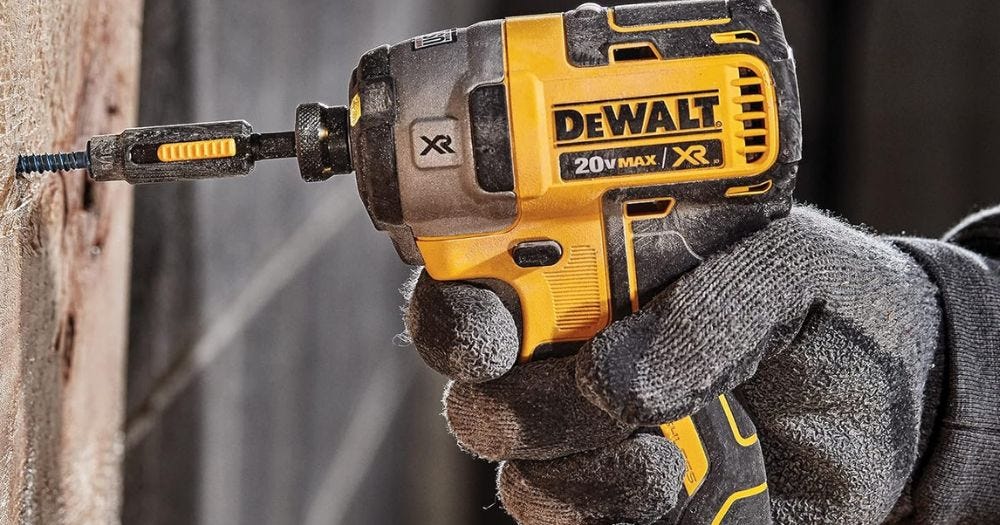
A drill that feels good in your hand reduces tiredness. Weight also affects how long you can work comfortably.
- Choose a drill with a comfortable grip
- Look for balanced weight distribution
- Pick a drill that is not too heavy for your strength
- Test how the drill feels during use before buying
Credit: medium.com
Cleaning Your Cordless Drill
Keeping your cordless drill clean helps it work well for a long time. Dirt and dust can stop it from working right.
Regular cleaning protects the drill and keeps it safe to use. It also stops parts from wearing out too fast.
Removing Dust And Debris
Dust and debris can build up inside and outside the drill. This can block vents and cause overheating.
Use a soft brush or compressed air to remove dust from the drill’s body and vents. Do this gently to avoid damage.
- Turn off and unplug the drill before cleaning
- Use a dry, soft brush for loose dust
- Blow compressed air into vents and crevices
- Wipe the drill with a dry cloth after brushing
Cleaning The Chuck And Bits
The chuck holds the drill bits and can get dirty or sticky. Clean it to keep bits tight and secure.
Remove the bit and wipe the chuck with a cloth. Use a small brush or toothpick to clear dirt inside the chuck.
- Remove drill bits before cleaning
- Use a clean cloth to wipe the chuck
- Clear dirt inside with a small brush or toothpick
- Lubricate the chuck lightly if it feels stiff
Avoiding Water Damage
Water can damage the drill’s motor and battery. Keep the drill dry to avoid rust and electrical problems.
If the drill gets wet, dry it with a cloth and let it air dry fully before using it again. Never use heat to dry it.
- Store the drill in a dry place
- Do not use the drill in wet conditions
- Dry the drill immediately if it gets wet
- Avoid spraying water or cleaners directly on the drill
Battery Care Tips
Taking good care of your cordless drill battery keeps it working longer. Proper battery care saves money and time.
Learn simple ways to charge, store, and extend the life of your battery.
Proper Charging Practices
Charge your battery fully before using your drill. Avoid charging it too long after it is full.
Use the charger made for your battery. Do not use cheap or damaged chargers.
- Charge in a cool, dry place
- Unplug charger after battery is full
- Avoid charging in extreme heat or cold
- Do not let the battery drain completely before charging
Storage Recommendations
Store batteries in a dry area at room temperature. Avoid places with too much heat or cold.
Keep batteries away from metal objects to prevent short circuits. Remove batteries from drills if you store them long.
- Store batteries half charged for long periods
- Do not leave batteries in the drill when not in use
- Keep batteries in original cases or insulated containers
Extending Battery Lifespan
Use your battery regularly to keep it active. Avoid letting it sit unused for months.
Clean battery contacts with a dry cloth to keep good connections. Avoid dropping or damaging the battery.
- Do not expose battery to water or moisture
- Charge battery before it is completely empty
- Use the battery within its recommended temperature range
Routine Maintenance Checks
Keeping your cordless drill in good shape helps it work longer. Regular checks stop problems early.
Simple maintenance steps keep your drill safe and ready for use anytime.
Inspecting For Wear And Tear
Look over your drill carefully to find worn parts. Check the chuck, battery, and casing for damage.
Replace or fix any part that looks cracked, loose, or worn out before using the drill.
- Check chuck for cracks or looseness
- Look for battery swelling or leaks
- Inspect casing for cracks or breaks
- Examine drill bits for dull edges
Lubricating Moving Parts
Apply light oil or grease to parts that move. This helps the drill run smoothly and lasts longer.
Focus on the chuck and any gears inside. Avoid over-lubricating as it can attract dust.
- Use machine oil on the chuck jaws
- Apply grease to internal gears if accessible
- Wipe off extra lubricant to prevent dirt build-up
Tightening Screws And Components
Loose screws can cause parts to wobble or break. Check all screws and bolts regularly.
Use the right screwdriver or wrench to tighten each one. Do not force screws to avoid stripping them.
- Check screws on the handle and casing
- Tighten chuck screws if accessible
- Inspect battery contacts and tighten if needed
Troubleshooting Common Issues
Cordless drills are useful tools that sometimes face problems. Fixing these issues helps your drill work longer.
This guide covers common drill problems and easy ways to solve them. Keep your drill ready for any job.
Drill Not Powering On
If your drill does not turn on, check the battery first. A dead or loose battery often causes this issue.
Also, look for dirt or damage on the battery contacts. Clean and reconnect them to ensure good contact.
- Charge the battery fully before use
- Remove and reinsert the battery securely
- Clean battery contacts with a dry cloth
- Check for any visible damage on the drill
Unusual Noises Or Vibrations
Strange sounds or shaking can mean parts inside the drill are loose or worn out. This can cause damage if ignored.
Check that the drill bit is tight and the chuck is clean. Dirt can cause uneven spinning and noise.
- Tighten the drill bit properly
- Clean the chuck regularly
- Inspect the drill for loose screws
- Replace worn parts if needed
Overheating Problems
A drill that gets too hot may stop working or get damaged. Overheating often happens after long use or heavy work.
Let the drill cool down between uses and avoid pressing too hard. This helps keep the motor safe.
- Take breaks during long jobs
- Use the correct drill bit for the material
- Keep vents clean and free of dust
- Avoid forcing the drill too hard

Credit: manuals.plus
Upgrading And Replacing Parts
Keeping your cordless drill in good shape means upgrading and replacing parts. This helps the drill work better and last longer. Knowing when and how to replace parts is important for safety and performance.
Read on to learn about replacing drill bits, battery care, and selecting the right accessories for your drill.
When To Replace Drill Bits
Drill bits wear out after use. Replace them if they are dull, bent, or broken. Using worn bits can damage your work and the drill. Look for signs like slow drilling or rough holes.
- Dull edges that don’t cut well
- Bits that are bent or warped
- Broken or chipped tips
- Overheating during use
Battery Replacement Tips
Batteries lose power over time. Replace the battery if your drill runs out quickly or won’t charge fully. Use the right battery type for your drill model. Store batteries in a cool, dry place to extend life.
| Battery Issue | Replacement Tip |
| Short runtime | Replace with a new battery of same voltage |
| Won’t charge | Check charger, then replace battery if needed |
| Battery swelling | Stop use immediately, replace battery safely |
| Slow drill speed | Consider battery replacement or cleaning contacts |
Choosing Compatible Accessories
Use accessories that match your drill’s brand and model. Wrong accessories can cause damage or poor performance. Check size, fitting type, and power ratings before buying.
- Match shank size with drill chuck
- Use accessories made for cordless drills
- Check manufacturer’s recommendations
- Avoid cheap, low-quality parts
Storage Solutions
Proper storage is important to keep cordless drills working well. Good storage protects drills from damage.
Storing drills correctly also helps keep accessories in order and ready to use.
Protecting From Moisture And Dust
Moisture and dust can harm cordless drills. They cause rust and block moving parts.
Use cases or sealed containers to keep out moisture and dust. Wipe drills clean before storing.
- Store drills in dry places
- Use dust covers or cases
- Clean drills before storage
- Check for moisture regularly
Organizing Drill And Accessories
Keep your drill and accessories organized to avoid losing parts. It also saves time.
Use storage boxes with compartments for drill bits, chargers, and batteries. Label compartments clearly.
- Use small boxes for drill bits
- Keep batteries in a separate section
- Charge batteries before storing
- Label compartments for easy finding
Ideal Temperature Conditions
Keep cordless drills in places with stable, moderate temperatures. Extreme heat or cold can damage batteries.
Avoid storing drills near heaters or in freezing garages. Room temperature is best for long battery life.
- Store drills at 50°F to 77°F (10°C to 25°C)
- Avoid direct sunlight
- Keep away from heaters or freezers
- Use insulated storage if needed

Credit: www.popularmechanics.com
Frequently Asked Questions
How Often Should I Clean My Cordless Drill?
Clean your cordless drill after every use. Wipe down the exterior and remove dust from vents. Regular cleaning prevents buildup and ensures better performance.
How Do I Properly Charge A Cordless Drill Battery?
Use the charger designed for your battery type. Charge batteries fully but avoid overcharging. Store batteries in a cool, dry place when not in use.
What Maintenance Extends Cordless Drill Battery Life?
Avoid deep discharges and extreme temperatures. Charge batteries regularly and store them partially charged. Clean contacts and avoid dropping the battery for longer life.
How Can I Lubricate A Cordless Drill Correctly?
Apply a small amount of light machine oil on moving parts. Avoid over-lubrication to prevent dust buildup. Lubricate gears and chuck to maintain smooth operation.
Conclusion
Regular care keeps your cordless drill working well. Clean the drill after each use. Charge the battery fully and store it in a cool place. Check for loose parts and tighten them often. Use the right drill bit for each job.
These small steps help your drill last longer. Save money by avoiding early replacements. Enjoy smooth and safe drilling every time. Keep your tools ready for any task ahead. Simple habits make a big difference in tool life.