Are you ready to save time and effort while putting together your new furniture? Using a power screwdriver can make the job faster, easier, and less frustrating.
But if you’re not sure how to handle this handy tool, you might end up damaging your furniture or struggling through the process. In this guide, you’ll learn simple, step-by-step tips to use a power screwdriver like a pro. By the end, you’ll feel confident and efficient, turning any flat-pack challenge into a smooth, satisfying experience.
Keep reading to discover how to make your furniture assembly quick and hassle-free!
Choosing The Right Power Screwdriver
Using a power screwdriver makes furniture assembly faster and easier. Picking the right one helps you work better and avoid problems.
There are many types of power screwdrivers. Knowing their features helps you choose the best tool for your needs.
Types Of Power Screwdrivers
Power screwdrivers come in different types. Each type fits certain tasks better than others.
- Corded Screwdrivers:Plug into power outlets for constant power.
- Cordless Screwdrivers:Use batteries for easy movement.
- Electric Screwdrivers:Lightweight and good for small jobs.
- Impact Drivers:Stronger torque for tough screws and hard materials.
Key Features To Look For
Some features make a power screwdriver easier and safer to use. Check these before buying.
- Torque Settings:Allows control of screw tightness.
- Speed Control:Lets you adjust how fast the screwdriver spins.
- Ergonomic Design:Comfortable grip reduces hand fatigue.
- LED Light:Helps see in dark or tight spaces.
- Bit Compatibility:Works with different screw sizes and types.
Battery Vs Corded Options
Power screwdrivers come with batteries or cords. Each type has benefits and limits.
Battery-powered screwdrivers offer freedom to move. They are good for places without power outlets.
Corded screwdrivers provide steady power. They work well for long tasks without worrying about charging.
- Battery:Portable, limited by battery life, lighter weight.
- Corded:Unlimited power, heavier, needs nearby outlet.
Credit: motionarray.com
Preparing For Assembly
Using a power screwdriver makes furniture assembly faster and easier. Before you start, it is important to prepare well. Good preparation helps avoid mistakes and saves time.
This guide covers three key steps to prepare for assembly. These are gathering your tools and materials, reading the furniture manual, and setting up your workspace.
Gathering Tools And Materials
First, collect all the tools and materials you will need. This includes the power screwdriver and any bits it requires. You may also need screws, bolts, or other fasteners.
Check if you need extra tools like a hammer or a wrench. Having everything ready avoids stopping during assembly.
- Power screwdriver with charged battery
- Correct screwdriver bits
- Screws, bolts, and fasteners
- Additional tools like hammer or wrench
- Protective gloves and safety glasses
Reading The Furniture Manual
Read the furniture manual carefully before starting. The manual shows important steps and parts needed for assembly. It also explains how to use the power screwdriver safely.
Follow the instructions step-by-step. Understanding the manual reduces errors and helps finish assembly faster.
- Locate all parts and check quantities
- Identify types of screws and fasteners
- Note any special instructions or warnings
- Understand the order of assembly steps
Setting Up Your Workspace
Choose a clean, flat area with enough space to spread out all parts. A well-lit workspace helps you see details clearly. Keep your tools nearby for easy access.
Protect the floor or surface with a soft cloth or cardboard. This prevents scratches on your furniture parts during assembly.
- Clear a large, flat surface
- Use good lighting
- Arrange tools within reach
- Cover surface to prevent damage
- Keep small parts in containers to avoid loss
Basic Power Screwdriver Techniques
Using a power screwdriver makes furniture assembly faster and easier. Learning the basic techniques helps you work safely and efficiently.
This guide covers how to attach and change bits, adjust torque settings, and use the proper grip and handling.
Attaching And Changing Bits
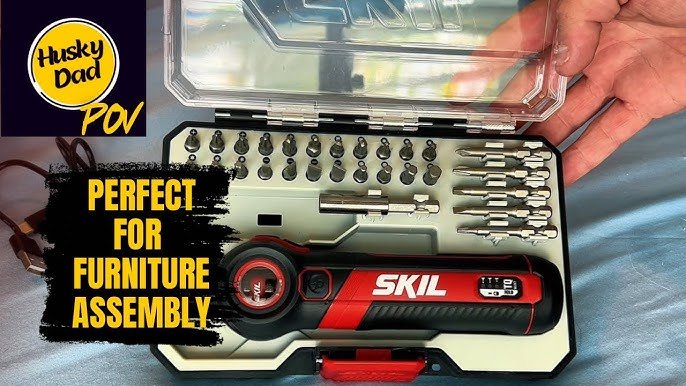
Choose the right bit for your screws. Most power screwdrivers have a chuck or bit holder to secure the bit. To change bits, pull the collar back and remove the bit. Insert the new bit and release the collar to lock it in place.
- Check bit size and type before attaching.
- Use magnetic bits for easier handling.
- Keep bits clean to avoid slipping.
- Store bits safely when not in use.
Adjusting Torque Settings
Torque controls how much force the screwdriver applies. Adjusting torque helps avoid stripping screws or damaging furniture.
| Torque Setting | Use Case |
|---|---|
| Low | Soft materials and small screws |
| Medium | General furniture assembly |
| High | Hard materials and large screws |
Proper Grip And Handling
Hold the power screwdriver with a firm grip. Keep your wrist straight and apply steady pressure. This helps control the tool and prevents slipping.
- Use your dominant hand for better control.
- Keep your other hand steady on the furniture.
- Do not force the screwdriver; let the tool do the work.
- Wear safety glasses to protect your eyes.

Credit: www.amazon.in
Step-by-step Assembly Process
Using a power screwdriver can speed up furniture assembly. It makes driving screws easier and quicker.
This guide shows how to use a power screwdriver safely and correctly. Follow each step for smooth assembly.
Starting With Pilot Holes
Pilot holes help guide screws into wood without splitting it. Use a drill bit smaller than the screw’s diameter.
Mark the spots where screws will go. Drill pilot holes straight and to the right depth for your screws.
Driving Screws Efficiently
Hold the power screwdriver firmly and keep it aligned with the screw. Press the trigger gently at first.
- Start with low speed to avoid stripping screws
- Increase speed once the screw is steady in the hole
- Stop driving when the screw head is flush with the surface
- Use the correct screwdriver bit for each screw type
Avoiding Common Mistakes
| Mistake | How to Avoid |
| Driving screws at an angle | Keep the screwdriver perpendicular to the surface |
| Over-tightening screws | Release the trigger as soon as the screw is flush |
| Using wrong screwdriver bit | Match the bit size and type to the screw head |
| Skipping pilot holes | Always drill pilot holes to prevent wood damage |
Safety Tips And Maintenance
Using a power screwdriver helps you build furniture faster. It is important to stay safe and keep the tool in good shape.
Following simple safety and maintenance steps can prevent accidents and make your screwdriver last longer.
Protective Gear Recommendations
Wear the right protective gear before using a power screwdriver. This keeps you safe from dust and sharp objects.
- Safety glasses protect your eyes from flying debris
- Work gloves prevent cuts and improve grip
- Closed-toe shoes protect your feet from falling tools
- Ear protection reduces noise from the screwdriver
Cleaning And Storing Your Screwdriver
Clean your power screwdriver after each use. Dirt and dust can damage the tool over time.
Store it in a dry and safe place to avoid rust and damage.
- Wipe the screwdriver with a dry cloth
- Remove any screws or bits attached
- Keep the battery charged but remove it if storing long
- Store in a toolbox or case to protect from dust
Troubleshooting Common Issues
If your power screwdriver stops working, check some common problems first. Fixing them can be quick and easy.
- Battery not charged – plug in and charge fully
- Loose screwdriver bit – tighten or replace the bit
- Tool not turning on – check the switch and battery connection
- Slow operation – clean dust from vents and moving parts

Credit: m.youtube.com
Frequently Asked Questions
How Do I Choose The Right Power Screwdriver?
Choosing the right power screwdriver depends on the project. Consider the screwdriver’s power, speed settings, and battery life. For assembling furniture, a lightweight, cordless model with adjustable torque settings is ideal. Ensure it has a comfortable grip for extended use.
Reading reviews can also help in making an informed decision.
What Safety Precautions Should I Follow?
Always wear safety goggles and gloves when using a power screwdriver. Ensure your workspace is well-lit and organized to prevent accidents. Keep fingers away from the screwdriver bit during operation. Unplug or remove the battery from the tool when not in use.
Follow the manufacturer’s instructions for safe handling.
Can A Power Screwdriver Damage Furniture?
Yes, a power screwdriver can damage furniture if not used correctly. Applying excessive torque can strip screws or damage the wood. Always use the appropriate bit size and adjust torque settings according to the material. Practice on scrap material if you’re unsure, and proceed slowly to avoid mistakes.
How Do I Maintain My Power Screwdriver?
Regularly clean your power screwdriver to ensure optimal performance. Remove dust and debris from vents and moving parts. Check for any loose screws or parts and tighten them. Charge the battery fully before storing, and store it in a dry place.
Follow the manufacturer’s maintenance guidelines for longevity.
Conclusion
Using a power screwdriver makes furniture assembly faster and easier. Always choose the right bit for each screw. Keep steady pressure and control to avoid slipping. Take your time and follow instructions carefully. Safety matters—wear goggles and keep fingers clear.
With practice, you will feel more confident and skilled. Simple steps lead to better results every time. Now, you’re ready to build furniture with less hassle. Enjoy your work and the final product!