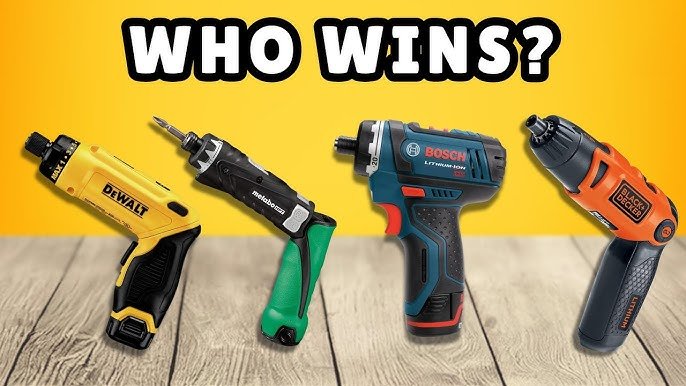
Are you tired of spending endless hours with a manual screwdriver, only to end up with sore wrists and a half-finished project? If you’re nodding in agreement, it’s time to embrace the efficiency of a power screwdriver for your assembly tasks.
This tool isn’t just for professionals—it’s a game-changer for anyone looking to save time and effort. Imagine completing your projects in record time while achieving precision that even the most skilled hands can’t match. In this guide, you’ll discover the secrets to mastering a power screwdriver, transforming your assembly process into a smooth, stress-free experience.
Ready to revolutionize the way you work? Keep reading to unlock the full potential of your power screwdriver and make every assembly task a breeze.
Choosing The Right Power Screwdriver
Using a power screwdriver makes assembly faster and easier. Picking the right one helps you work well and avoid mistakes.
This guide covers types of power screwdrivers, key features to check, and the choice between battery and corded models.
Types Of Power Screwdrivers
There are several types of power screwdrivers for different needs. Some are small and light for simple tasks. Others are stronger for tough jobs.
- Cordless Screwdrivers: Easy to carry and use anywhere.
- Corded Screwdrivers: Provide steady power without battery worries.
- Impact Drivers: Good for heavy-duty work and tight screws.
- Right-Angle Screwdrivers: Fit into tight spaces and corners.
- Precision Screwdrivers: Designed for small screws in electronics.
Key Features To Consider
Look for features that match your assembly tasks. Comfort, power, and speed control are important. Also, check the screwdriver’s size and weight.
| Feature | Why It Matters |
| Torque Settings | Control screw tightness to avoid damage |
| Variable Speed | Adjust speed for different materials |
| Ergonomic Grip | Reduces hand fatigue during use |
| LED Light | Improves visibility in dark areas |
| Bit Storage | Keeps bits handy and organized |
Battery Vs Corded Models
Decide between battery-powered and corded models based on your work style. Each has benefits and limits.
- Battery Models:Offer freedom to move without cables.
- Battery Models:May need recharging during long jobs.
- Corded Models:Provide constant power for heavy use.
- Corded Models:Require access to power outlets.

Credit: manuals.plus
Essential Safety Tips
Using a power screwdriver helps you finish assembly tasks faster. It is important to stay safe while working with it.
Follow these safety tips to avoid accidents and injuries during your project.
Protective Gear
Wearing the right protective gear keeps you safe from flying debris and sharp objects. Always protect your eyes and hands.
Use gloves to avoid cuts and safety glasses to protect your eyes from dust and small particles.
- Wear safety glasses or goggles
- Use gloves suited for handling tools
- Consider ear protection if noise is loud
Safe Handling Practices
Hold the power screwdriver firmly and keep your hands away from the bit. This helps prevent slips and injuries.
Use the correct screwdriver bit for the screws. Do not force the tool if it gets stuck or jammed.
- Always grip the handle tightly
- Check that the bit fits the screw
- Keep fingers clear of the rotating bit
- Turn off the tool before changing bits
- Do not use excessive force to avoid damage
Work Area Preparation
Clear your workspace of clutter to avoid tripping or knocking things over. A clean area helps you work safely and better.
Make sure the area is well-lit. Good lighting helps you see the screws and work with precision.
- Remove any objects that can cause trips
- Keep tools organized and within reach
- Work on a stable surface
- Ensure proper lighting in the area
Preparing For Assembly
Using a power screwdriver can make assembly faster and easier. Before starting, it is important to get ready well.
Good preparation helps prevent mistakes and saves time during assembly.
Gathering Tools And Materials
Collect all the tools and materials you will need before you begin. This keeps everything close and easy to reach.
Besides the power screwdriver, you may need bits, screws, and safety gear.
- Power screwdriver with charged battery
- Different screwdriver bits
- Assorted screws and fasteners
- Safety glasses and gloves
- Work surface or mat
Reading Assembly Instructions
Read the instructions carefully before starting. This helps you understand the steps and parts needed.
Look for warnings and special notes about the power screwdriver use.
- Check all steps to see the order of assembly
- Note any screws that need specific bits
- Understand how parts fit together
Organizing Screws And Components
Sort screws and parts by type and size. This makes it easy to find the right piece during assembly.
Use small containers or trays to keep screws and components organized and prevent loss.
- Group screws by size and shape
- Label containers if possible
- Place components in order of assembly
- Keep small parts away from edges
Credit: www.temu.com
Setting Up Your Power Screwdriver
Using a power screwdriver makes assembly faster and easier. Setting it up correctly ensures good results.
Before you start, check the tool and prepare it for your task. This guide helps you set up your power screwdriver.
Selecting The Correct Bit
Bits fit into the screwdriver and hold the screw. Choose the right bit for your screw type and size.
Using the wrong bit can damage screws or the tool. Match the bit shape to the screw head.
- Phillips bits for cross-shaped screws
- Flathead bits for straight screws
- Torx bits for star-shaped screws
- Hex bits for hexagonal screws
Adjusting Torque Settings
Torque controls how much force the screwdriver uses. Set it right to avoid overdriving or stripping screws.
Low torque works for small screws or soft materials. High torque suits big screws or hard materials.
- Start with low torque for delicate parts
- Increase torque for tougher jobs
- Test on scrap material if unsure
Charging And Powering On
Make sure your screwdriver battery is charged before use. A full charge ensures consistent power.
Turn on the tool by pressing the power button or trigger. Check it runs smoothly before starting work.
- Charge battery fully before first use
- Keep spare batteries if possible
- Check power button and trigger function
- Use the tool at full charge for best results
Step-by-step Assembly Process
Using a power screwdriver can make assembly faster and easier. It helps to secure screws tightly without much effort.
Follow these steps to use the power screwdriver safely and correctly for your projects.
Positioning Screws Correctly
Place the screw on the screwdriver bit before you start. Make sure the screw fits the bit size to avoid slipping.
Align the screw tip with the hole you want to fasten. This helps the screw go in straight and hold parts firmly.
- Use the right screwdriver bit for the screw head
- Hold the screw steady on the bit before driving
- Start the screw gently to avoid slipping
Maintaining Proper Angle
Keep the power screwdriver at a 90-degree angle to the surface. This ensures the screw goes in straight and holds well.
Tilting the screwdriver can cause the screw to strip or damage the material. Adjust your position to keep the angle steady.
- Hold the screwdriver handle firmly
- Check the angle before starting the screw
- Adjust your hand or body to keep the tool straight
Controlling Speed And Pressure
Use low speed to start the screw into the material. This helps the screw bite in without slipping.
Apply steady pressure while driving the screw. Too much force can strip the screw head or damage the surface.
- Start at slow speed for better control
- Increase speed once the screw is set
- Keep steady pressure, not too hard or too soft
Troubleshooting Common Issues
Using a power screwdriver makes assembly easier and faster. Sometimes, small problems can slow you down. This guide helps you fix common issues quickly.
Knowing how to solve these problems keeps your work smooth. Below, find ways to handle stripped screws, bit slippage, and battery troubles.
Stripped Screws
Stripped screws happen when the screwdriver bit slips and damages the screw head. This makes it hard to remove or tighten screws.
- Use a screwdriver bit that fits the screw well.
- Apply steady pressure when turning the screw.
- Try a rubber band between the bit and screw for extra grip.
- Use pliers to turn the screw if the head is badly damaged.
- Drill out the screw as a last option.
Bit Slippage
Bit slippage happens when the driver bit moves out of the screw head. This can cause injury or damage the workpiece.
| Cause | Fix |
| Wrong bit size | Use the correct bit size for the screw. |
| Worn bit tip | Replace the bit with a new one. |
| Insufficient pressure | Press the screwdriver firmly while driving. |
| Damaged screw head | Remove and replace the screw if possible. |
Battery Performance Problems
Power screwdriver battery issues can cause weak power or no power at all. This stops your work and wastes time.
- Charge the battery fully before use.
- Keep batteries at room temperature.
- Do not overcharge or leave batteries unused for long.
- Use the charger that came with the screwdriver.
- Replace old batteries that hold little charge.
Maintaining Your Power Screwdriver
Keeping your power screwdriver in good shape helps it last longer. Regular care stops problems and keeps it working well.
This guide shows easy ways to clean, check, and replace parts of your tool.
Cleaning And Storage Tips
Clean your screwdriver after each use. Dirt and dust can harm the tool. Use a soft cloth to wipe the outside.
- Remove dust from vents with a small brush
- Keep the battery contacts clean and dry
- Store the screwdriver in a dry, cool place
- Avoid leaving it in direct sunlight or damp areas
Regular Maintenance Checks
Check your power screwdriver often. Look for loose parts or damage. Test the trigger and speed settings.
| Check | What to Look For | Action Needed |
| Trigger | Sticks or does not respond | Clean or replace |
| Chuck | Wobbles or won’t hold bits | Tighten or service |
| Battery | Does not hold charge | Recharge or replace |
| Body | Cracks or loose screws | Tighten or repair |
When To Replace Parts
Parts wear out over time. Replace parts that slow your work or cause damage.
- Replace the battery if it loses power quickly
- Change worn-out screwdriver bits for better grip
- Swap broken triggers or buttons to keep control
- Fix or replace the chuck if it no longer holds bits

Credit: www.assemblymag.com
Frequently Asked Questions
What Safety Tips Should I Follow Using A Power Screwdriver?
Always wear safety goggles and gloves. Keep the work area clean and well-lit. Avoid loose clothing or jewelry. Disconnect the tool when changing bits. Use the correct bit for screws to prevent slipping or damage.
How Do I Choose The Right Bit For Assembly?
Select a bit that matches the screw head type and size. Using the right bit ensures better grip and reduces damage. Check bit compatibility with your power screwdriver model for optimal performance.
Can I Use A Power Screwdriver On Delicate Materials?
Yes, but use low torque settings. Test on a scrap piece first. Avoid over-tightening to prevent damaging or cracking delicate materials during assembly.
How To Maintain A Power Screwdriver For Long Life?
Regularly clean the tool and bits. Lubricate moving parts as per the manual. Store it in a dry place. Inspect for wear and replace worn parts promptly to ensure longevity.
Conclusion
Using a power screwdriver makes assembly faster and easier. Always choose the right bit for your screws. Keep steady hands and apply gentle pressure while working. Take breaks to avoid mistakes and tiredness. Practice safety by wearing goggles and keeping fingers clear.
With patience, your skills will improve quickly. This tool saves time and effort on many projects. Start small, and soon you will feel confident. Power screwdrivers can help in homes, workshops, or DIY tasks. Follow these tips to build with less hassle and more success.