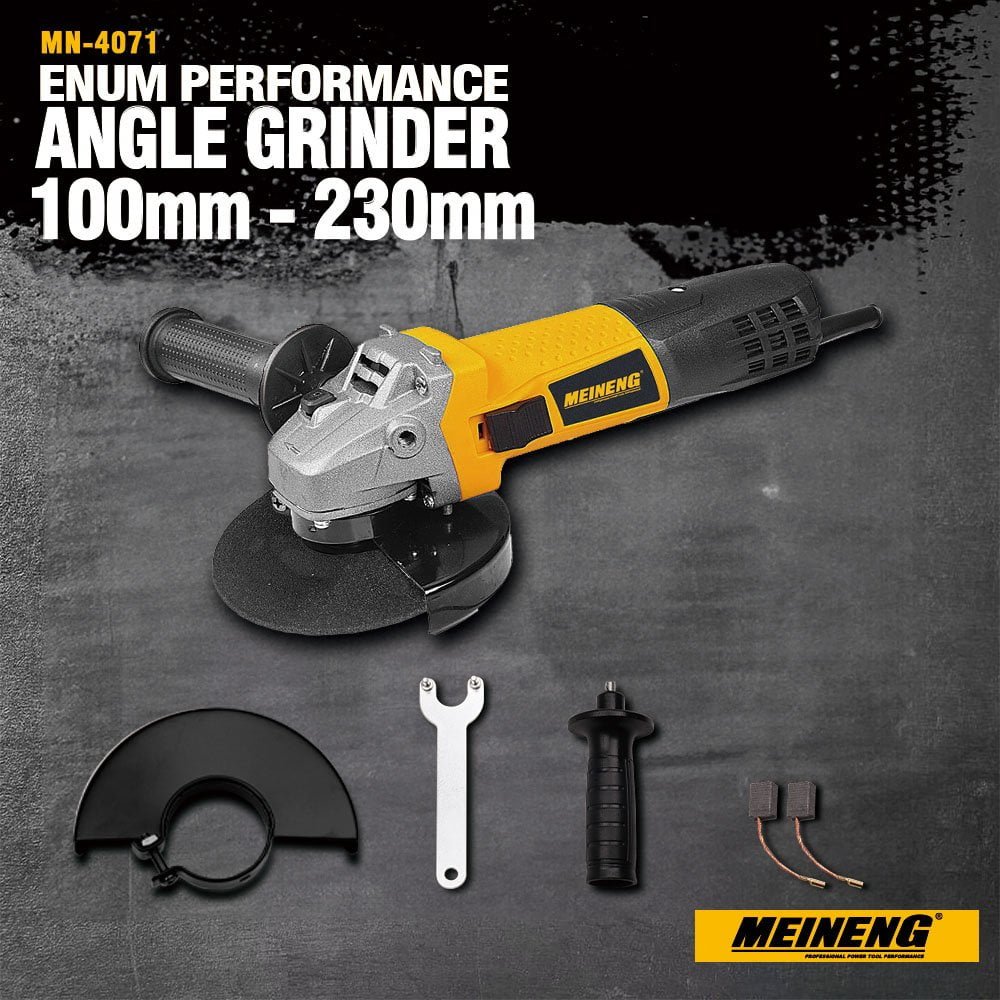
Are you tired of your angle grinder giving up on you just when you need it the most? If you’ve ever found yourself frustrated with an underperforming tool, you’re not alone.
Maintaining your angle grinder is crucial to ensure it runs smoothly and lasts longer. Imagine the time and money you could save by simply taking a few easy steps to care for your equipment. In this guide, you’ll discover practical tips that will keep your angle grinder in top shape.
You’ll learn how to maximize its efficiency and reliability, so you can tackle any project with confidence. Ready to unlock the full potential of your angle grinder and avoid unnecessary setbacks? Keep reading to find out how.
Choosing The Right Angle Grinder
Choosing the right angle grinder is important for safety and efficiency. The right tool makes your work easier and lasts longer.
Knowing the types of grinders and matching them to your tasks helps you pick the best one for your needs.
Types Of Angle Grinders
Angle grinders come in different sizes and power sources. Each type suits different jobs and skill levels.
- Electric grinders are common and easy to use.
- Battery-powered grinders offer portability.
- Pneumatic grinders use air pressure and are lighter.
- Small grinders fit into tight spaces.
- Large grinders handle heavy-duty work.
Pick a type that matches your work style and the power you need.
Matching Grinder To Task
Different tasks require different grinders. Using the right grinder improves safety and results.
For cutting metal, use a grinder with a strong motor and the right disc size. For polishing, a smaller grinder with speed control works best.
- Light grinding: small, lightweight grinders.
- Heavy cutting: large grinders with high power.
- Polishing and sanding: grinders with adjustable speed.
- Tight spaces: compact angle grinders.
Daily Inspection Tips
Maintaining your angle grinder each day keeps it safe and efficient. A quick check before use can prevent accidents.
Inspect parts like the power cord, grinding disc, guard, and handle to spot damage early. This helps you fix issues quickly.
Checking Power Cord And Plug
Look for cuts, cracks, or frayed areas on the power cord. A damaged cord can cause electric shock or short circuits.
Check the plug for bent or broken prongs. Make sure it fits tightly in the outlet and does not wobble.
- Do not use the grinder if the cord is damaged
- Replace plugs that have loose or broken prongs
- Avoid pulling the cord to unplug the tool
- Keep the cord away from heat and sharp edges
Inspecting The Grinding Disc
Check the grinding disc for cracks, chips, or wear. A damaged disc can break during use and cause injury.
Make sure the disc is the right size and type for your angle grinder. Using the wrong disc can damage the tool.
- Look for signs of cracks or chips on the disc
- Replace discs that are worn or damaged
- Use discs that match the grinder’s speed rating
- Ensure the disc is securely fastened before use
Assessing The Guard And Handle
Check the guard for cracks or bends. The guard protects you from sparks and debris during grinding.
Make sure the handle is tight and comfortable to hold. A loose handle can cause loss of control while using the grinder.
- Replace guards that are cracked or damaged
- Tighten loose handles before starting work
- Adjust the guard to the correct position for your task
- Use both hands to hold the grinder firmly
Cleaning And Lubrication
Keeping your angle grinder clean and well-lubricated helps it last longer. Dirt and old grease can stop it from working well.
Regular cleaning and lubrication make your tool safer and more effective to use.
Removing Dust And Debris
Dust and debris build up inside the angle grinder during use. This buildup can block air vents and cause overheating.
Use a brush or compressed air to clear dust from all parts. Clean the vents carefully to keep air flowing.
- Unplug the grinder before cleaning
- Use a soft brush to remove dust
- Blow compressed air into vents and crevices
- Wipe the outside with a damp cloth
- Check the grinding disc area for trapped debris
Lubricating Moving Parts
Lubrication reduces friction and wear on moving parts inside the grinder. This helps the tool run smoothly and quietly.
Apply lubricant to the spindle and gears as recommended in the user manual. Avoid over-lubricating to prevent dirt buildup.
- Use the correct lubricant type specified by the manufacturer
- Apply a small amount to the spindle and gear area
- Clean old grease before applying new lubricant
- Do not let lubricant contact the grinding disc
- Lubricate regularly for best performance
Replacing Parts Safely
Maintaining your angle grinder ensures it works well and lasts longer. Replacing worn parts safely is very important. It helps you avoid accidents and keeps the tool in good condition.
Always use the correct replacement parts and follow safety steps. Wear protective gear like gloves and goggles to protect yourself during repairs.
Changing Grinding Discs
Grinding discs wear out or get damaged after use. Replace them carefully to avoid injury and machine damage. Make sure the angle grinder is unplugged or the battery is removed before starting.
- Remove the disc guard to access the disc.
- Use the wrench to loosen the disc nut.
- Take off the old grinding disc.
- Check the new disc for cracks or damage.
- Place the new disc on the spindle properly.
- Tighten the disc nut firmly but do not over-tighten.
- Replace the disc guard before use.
Replacing Brushes And Bearings
Brushes and bearings wear out with time and affect grinder performance. Replace them on time to keep the motor running smoothly. Always unplug the grinder before starting this work.
| Part | Signs to Replace | Safety Tips |
| Brushes | Motor sputters or stops | Use correct brush type; avoid metal contact |
| Bearings | Grinding noise or wobbling | Clean area; apply proper grease during install |
Proper Storage Practices
Storing your angle grinder correctly helps it last longer. It also keeps the tool safe and ready to use.
Good storage reduces damage from dust, moisture, and accidental drops. Follow these tips to keep your tool in top shape.
Avoiding Moisture Damage
Moisture can cause rust and electrical problems in your angle grinder. Keep the tool dry and away from damp areas.
- Store the angle grinder in a dry place with low humidity.
- Use a case or cover to protect it from water and dust.
- Wipe the tool dry if it gets wet before storing it.
- Avoid leaving it on cold surfaces where condensation can form.
Organizing Accessories
Keeping accessories organized saves time and prevents loss. It also protects parts from damage.
| Accessory | Storage Tip |
| Grinding Discs | Store flat in a dry box to avoid bending. |
| Wrenches | Keep with the tool or in a small container. |
| Brushes | Place in a labeled compartment or bag. |
| Protective Guards | Hang or store in a padded area to avoid damage. |

Credit: www.gz-supplies.com
Troubleshooting Common Issues
An angle grinder is a powerful tool used for cutting and grinding. Sometimes, it may face problems. Knowing how to fix these issues helps keep it working well.
This guide explains simple ways to solve common problems with your angle grinder. Follow these tips to maintain your tool effectively.
Dealing With Overheating
Overheating can stop your angle grinder from working. It happens if the tool runs too long or the air vents are blocked.
Turn off the grinder and let it cool down. Clean the air vents to allow better airflow. Avoid using the tool nonstop for long times.
- Check and clean air vents often
- Use the grinder in short bursts
- Replace worn brushes if needed
- Keep the tool dry and away from dust
Fixing Power Failures
If your angle grinder does not start, power failure may be the cause. This can be due to a bad plug, switch, or power cord.
Unplug the tool and check the power source. Look for damage on the cord or plug. Test the switch and replace it if it does not work.
- Inspect power cord for cuts or breaks
- Test the plug in another outlet
- Check the switch for proper function
- Replace damaged parts promptly
Resolving Unusual Noises
Strange sounds from the angle grinder can mean a problem. It could be loose parts, worn bearings, or debris inside the tool.
Turn off the grinder and look for loose screws or parts. Clean the tool carefully. If the noise continues, the bearings may need replacement.
- Tighten all screws and bolts
- Remove dust and debris regularly
- Listen for grinding or rattling noises
- Replace worn bearings or damaged parts
Safety Tips During Maintenance
Maintaining an angle grinder safely is very important. It helps prevent injuries and keeps the tool working well.
Always follow safety steps before and during maintenance. This guide covers key tips to protect yourself.
Wearing Protective Gear
Wear the right gear to protect your eyes, hands, and body from sparks and debris.
- Safety goggles to shield your eyes
- Heavy-duty gloves to protect your hands
- Long sleeves and pants to cover your skin
- Ear protection to reduce noise damage
- Dust mask to avoid breathing harmful particles
Disconnecting Power Source
Always unplug the angle grinder before any maintenance. This stops accidental starts that can cause harm.
| Action | Reason |
|---|---|
| Unplug from electric socket | Prevents accidental power on |
| Remove battery if cordless | Avoids unexpected startup |
| Check power cord for damage | Ensures safe electrical connection |
| Wait for the tool to stop fully | Prevents injury from moving parts |

Credit: www.youtube.com
Credit: extoltools.com
Frequently Asked Questions
How Often Should I Clean My Angle Grinder?
Clean your angle grinder after every use to prevent dust build-up. Regular cleaning extends tool life and improves performance. Use compressed air to blow out debris from vents and brushes. Wipe the exterior with a dry cloth. Proper maintenance keeps the grinder running smoothly.
What Safety Checks Should I Do Before Using An Angle Grinder?
Inspect the grinder for damaged parts, loose components, and frayed cords. Ensure the guard is securely attached. Check the grinding disc for cracks or wear. Always wear protective gear like gloves and goggles. Performing safety checks prevents accidents and tool damage.
How Do I Replace The Grinding Disc Correctly?
Unplug the angle grinder before replacing the disc. Use a wrench to loosen the locking nut. Remove the old disc carefully and fit the new one securely. Tighten the nut firmly but avoid overtightening. Correct disc replacement ensures safe and efficient operation.
Can I Use An Angle Grinder Without A Guard?
No, always use the guard for safety. The guard protects you from sparks and debris. Operating without it increases injury risks and violates safety guidelines. Never remove or bypass the guard during use.
Conclusion
Maintaining your angle grinder keeps it working well and safe. Clean it often to avoid dust build-up. Check the parts regularly for any damage or wear. Use the right tools and follow safety steps every time. Small efforts can extend your grinder’s life and save money.
A well-kept angle grinder makes your work easier and faster. Simple care goes a long way. Keep these tips in mind for lasting performance and safety.