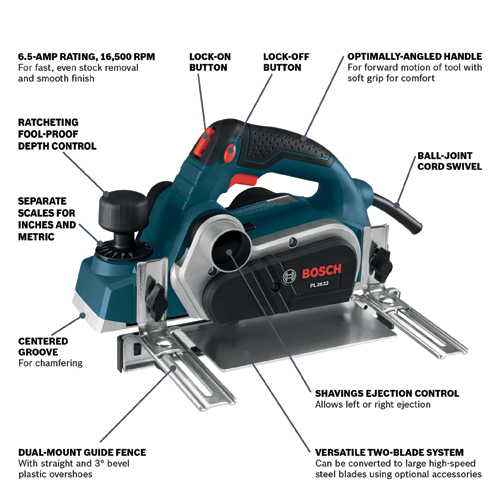
If you want your power planer motor to work smoothly and last longer, you need to take good care of it. Ignoring simple maintenance can lead to costly repairs or even a complete breakdown.
But don’t worry — with a few easy tips, you can keep your motor running like new. You’ll discover practical steps that save you time and money while boosting your tool’s performance. Ready to make your power planer motor more reliable?
Let’s dive in.
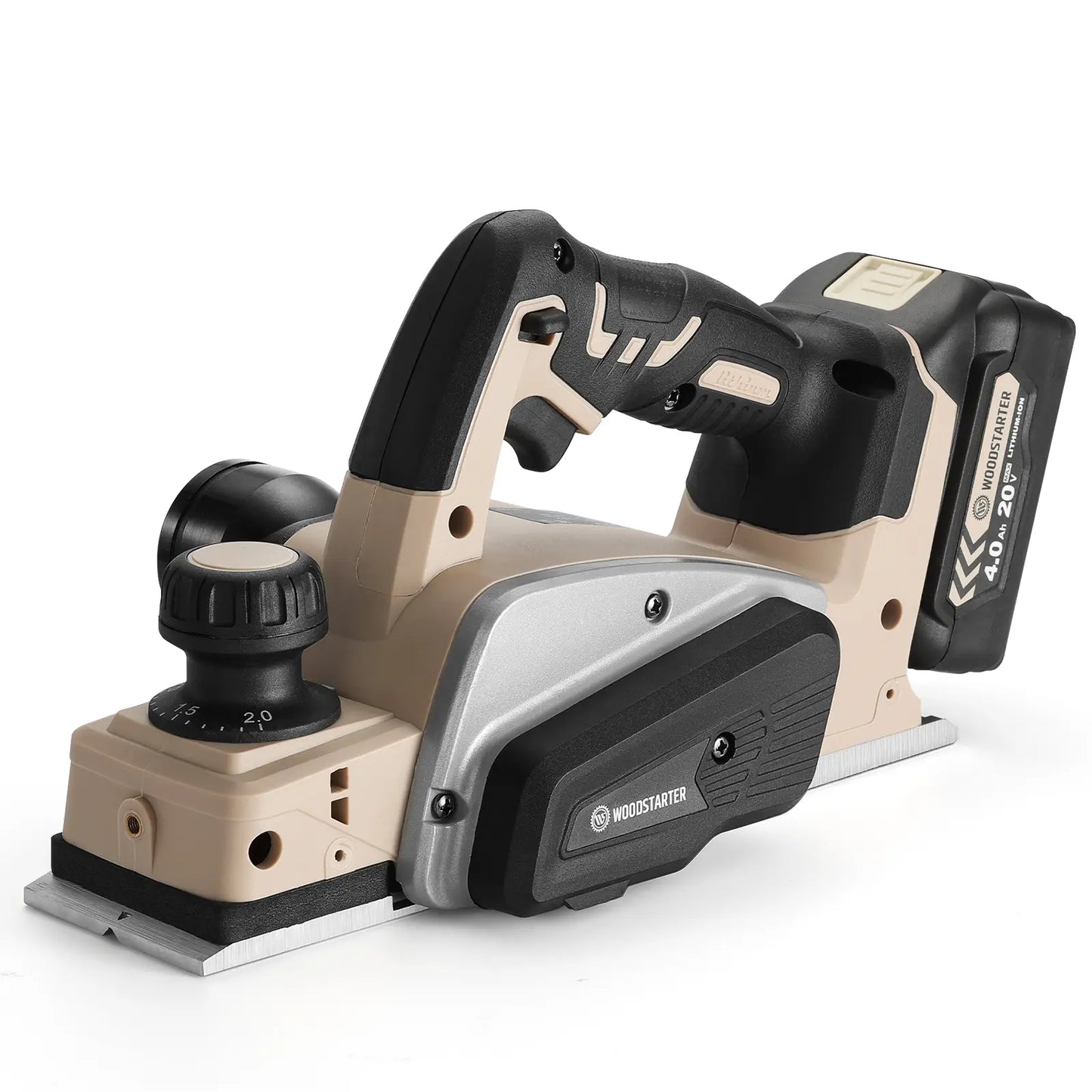
Credit: www.sainsmart.com
Common Power Planer Motor Issues
Power planer motors face several common problems during use. Knowing these issues helps with quick fixes and better maintenance.
This guide covers three main problems: overheating, unusual noises, and loss of power. Each one affects the tool’s performance.
Overheating Causes
Power planer motors can overheat if they run too long without a break. Dust and debris inside the motor block airflow and cause heat build-up.
Worn brushes or bearings increase friction and heat inside the motor. Using the wrong voltage also causes the motor to heat up quickly.
- Running the planer continuously for a long time
- Dust and debris blocking ventilation
- Worn out motor brushes or bearings
- Using incorrect power supply voltage
Unusual Noises
Strange sounds often mean something inside the motor is loose or damaged. Grinding or squealing noises can signal worn bearings.
Loose parts or debris caught in the motor also cause unusual noises. Listening to the motor helps find problems early before serious damage.
- Worn or damaged bearings
- Loose screws or parts
- Debris stuck in the motor
- Damaged fan blades inside the planer
Loss Of Power
A power planer may lose power due to electrical issues or worn motor components. Loose wiring can reduce motor strength.
Dirty or worn brushes cause poor contact and weak motor performance. Clogged air filters also reduce motor efficiency and power.
- Loose or damaged wiring
- Worn motor brushes
- Clogged air filters or vents
- Motor windings damage
Credit: www.lumberjocks.com
Routine Cleaning Techniques
Keeping your power planer motor clean helps it run smoothly. Dirt and dust can cause the motor to overheat and fail.
Regular cleaning keeps your tool safe and extends its life. Use simple methods to maintain it well.
Removing Dust And Debris
Dust builds up inside the motor and blocks cooling. Remove dust often to avoid damage.
- Unplug the planer before cleaning.
- Use a soft brush to clear dust from the motor.
- Blow air gently with a can of compressed air.
- Do not use water or wet cloth near the motor.
Cleaning Air Vents
Air vents let heat escape from the motor. Blocked vents cause overheating and motor damage.
| Cleaning Tip | Method |
| Remove large debris | Use a soft brush or cloth |
| Clear dust inside vents | Use compressed air spray |
| Check vents for damage | Inspect regularly and fix or replace |
Lubricating Moving Parts
Lubrication reduces friction and wear on moving parts inside the motor. Use the right oil or grease.
- Find the lubrication points in your power planer.
- Use a small drop of machine oil on each point.
- Wipe off any excess oil to avoid dust buildup.
- Do not over-lubricate as it can attract dirt.
Inspecting And Replacing Brushes
Power planer motors use brushes to transfer electric current. These brushes wear down over time. Checking and replacing them keeps the motor running well.
Regular brush care helps avoid motor damage. It also improves power planer performance and lifespan.
Checking Brush Wear
Inspect brushes often for signs of wear. Worn brushes cause poor motor function. Remove the brushes and look for cracks or uneven surfaces.
Measure the brush length. If it is shorter than the manufacturer’s limit, replace the brush.
- Remove brushes carefully from the motor
- Check for cracks or damage
- Measure brush length with a ruler
- Compare length to replacement guide
- Replace brushes if too short
Proper Brush Replacement
Use the correct replacement brushes for your power planer model. Installing the wrong size may cause motor problems.
Clean the brush holders before inserting new brushes. Insert brushes gently and ensure they move freely in the holders.
- Choose brushes specified by the manufacturer
- Turn off and unplug the power planer
- Clean brush holders with a soft brush
- Insert brushes without forcing them
- Check brush movement inside holders
Maintaining Brush Holders
Brush holders keep brushes in place and guide their movement. Keep holders clean and free of debris. Dirt can block brush movement and cause damage.
Check holders for wear or damage. Replace holders if they are cracked or worn out. Good holders extend brush life and improve motor performance.
- Clean holders regularly to remove dust
- Inspect holders for cracks or wear
- Replace damaged holders promptly
- Use compressed air to clear dust
- Ensure holders align brushes correctly
Motor Alignment And Balance
Power planer motors need proper alignment and balance for smooth operation. Poor alignment or imbalance can cause damage and reduce motor life.
Checking and fixing these issues help keep your planer running safely and efficiently.
Detecting Misalignment
Misalignment happens when motor parts are not in the correct position. It can cause vibrations and noise during use.
Look for signs like unusual sounds, motor heating, or uneven wear on parts to spot misalignment early.
- Listen for unusual noises while running
- Check for vibrations in the motor housing
- Inspect bearings and couplings for wear
- Look for uneven wear on belts or pulleys
Correcting Rotor Imbalance
Rotor imbalance causes shaking and can harm the motor. Balancing the rotor keeps the motor steady and working well.
Use balancing tools or weights to fix any uneven mass on the rotor. This reduces vibration and extends motor life.
- Inspect the rotor for dirt or damage
- Clean the rotor to remove any buildup
- Add balancing weights if the rotor is uneven
- Test the motor after balancing to check vibration
Electrical Connections And Wiring
Power planer motors need good electrical connections to work well. Wiring must be safe and secure to avoid problems.
Checking wiring often keeps the motor running longer. It also stops electric shocks and short circuits.
Checking For Loose Wires
Loose wires can cause the motor to stop or work poorly. They can also create sparks or short circuits.
Look carefully at all wire connections. Make sure each wire fits tightly into its terminal or connector.
- Turn off power before inspecting wires
- Use a screwdriver to tighten loose screws
- Check wires for cracks or breaks
- Replace damaged wires immediately
Ensuring Proper Insulation
Insulation protects wires from damage and stops electric shocks. It keeps the wires from touching each other.
Check wire insulation for cracks, cuts, or wear. Replace any wires with damaged insulation to stay safe.
- Use electrical tape to cover minor insulation damage
- Use heat shrink tubing for strong insulation
- Keep wires away from sharp edges and heat
- Do not bend wires sharply to avoid insulation breaks

Credit: www.vevor.com
Preventive Maintenance Schedule
Keeping your power planer motor in good shape helps it last longer. Regular checks can stop problems early.
This schedule guides you on daily, monthly, and yearly care steps. Follow them to keep the motor running smoothly.
Daily Checks
Each day, check the power planer motor before use. Look for signs of damage or unusual sounds. Make sure the motor is clean and free of dust.
- Inspect the power cord for cuts or frays
- Ensure all screws and bolts are tight
- Listen for unusual noises during operation
- Check for overheating while running
- Clean the motor surface from dust and debris
Monthly Inspections
Every month, perform deeper checks to keep the motor healthy. These steps help spot wear and tear early.
| Inspection Item | What to Check | Action Needed |
| Brushes | Wear level | Replace if worn below 5mm |
| Bearings | Noise or roughness | Lubricate or replace if noisy |
| Cooling vents | Clear of dust | Clean to ensure airflow |
| Connections | Secure and clean | Tighten or clean terminals |
Annual Overhaul
Once a year, give your power planer motor a full service. This keeps all parts working well and prevents major breakdowns.
- Disassemble the motor carefully to inspect internal parts.
- Check the armature and stator for damage or wear.
- Clean all components with appropriate solvents.
- Replace worn parts such as brushes, bearings, and seals.
- Reassemble the motor and test its performance.
Safety Tips During Maintenance
Maintaining power planer motors requires careful attention to safety. Following proper procedures can prevent accidents and injuries.
Always prepare your workspace and tools before starting any maintenance task. Safety should be your top priority at all times.
Power Disconnection Procedures
Before working on any power planer motor, disconnect it completely from the power source. This step avoids unexpected starts that can cause harm.
- Turn off the power switch on the planer.
- Unplug the power cord from the electrical outlet.
- Use a lockout/tagout device if available to secure the power source.
- Double-check that the motor does not start by trying to turn it on briefly.
Using Protective Gear
Wear the right protective gear to protect yourself from dust, debris, and electrical hazards during maintenance.
| Protective Gear | Purpose |
| Safety Glasses | Protect eyes from flying debris |
| Gloves | Shield hands from sharp edges and electrical shocks |
| Dust Mask | Prevent inhalation of fine dust particles |
| Ear Protection | Reduce noise exposure during motor testing |
Frequently Asked Questions
How Often Should I Clean My Planer Motor?
Regular cleaning every three months helps maintain your power planer’s efficiency. Dust and debris can accumulate, affecting motor performance. Use compressed air to remove dust from vents. This prevents overheating and prolongs motor life. Always refer to the manufacturer’s manual for specific maintenance guidelines.
What Signs Indicate Motor Wear In Planers?
Signs of motor wear include unusual noises, reduced performance, or overheating. If the planer struggles with basic tasks, it’s a concern. Regular inspections can catch issues early. Replace worn parts promptly to avoid further damage. Proper lubrication and cleaning can mitigate wear and extend motor life.
How Can I Prevent Planer Motor Overheating?
To prevent overheating, ensure proper ventilation and regularly clean dust from vents. Avoid overloading the planer during use. Allow the motor to cool between tasks. Use the appropriate blade settings for the material. Regular maintenance, including lubrication, can help reduce overheating risks.
What Are Common Power Planer Motor Issues?
Common issues include overheating, unusual noises, and reduced performance. Dust accumulation can lead to overheating. Unusual noises may indicate worn bearings. Regular maintenance, like cleaning and lubrication, can prevent these problems. Promptly addressing issues ensures the motor functions efficiently and extends its lifespan.
Conclusion
Maintaining your power planer motor keeps it running smoothly. Clean the motor regularly to avoid dust buildup. Check the brushes and replace worn parts on time. Use the right oil to keep moving parts working well. Store the tool in a dry, safe place to prevent damage.
Small efforts can extend your tool’s life and performance. Keep these tips in mind for better, longer-lasting results. Your power planer will thank you with consistent power and precision.