Are you tired of dealing with a sluggish table saw motor? You’re not alone.
Maintaining your table saw motor might seem daunting, but it’s essential for ensuring your tool’s longevity and performance. Imagine the satisfaction of a perfectly smooth cut every time, without any unexpected stops or stutters. In this guide, you’ll discover simple yet effective tips to keep your table saw motor in top shape.
Whether you’re a seasoned woodworker or a DIY enthusiast, these practical steps will save you time, money, and frustration. Dive into the rest of the article to unlock the secrets to a more efficient and reliable table saw experience. Your projects—and your sanity—will thank you.
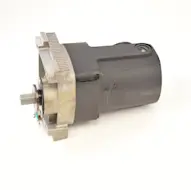
Credit: www.searspartsdirect.com
Common Table Saw Motor Issues
Table saw motors are vital for smooth cutting tasks. They can face issues that affect performance.
Understanding common motor problems helps keep your saw working well and safe.
Overheating Symptoms
Overheating can damage the motor quickly. It happens when the motor runs too long or is overloaded.
Signs include a hot motor casing and a burning smell near the saw. The motor may also shut off suddenly.
- Motor casing feels very hot to touch
- Burning or electrical smell
- Motor stops without warning
- Cutting power drops during use
Unusual Noises
Strange sounds from the motor can mean loose parts or worn-out bearings. These noises may get louder over time.
Listen for grinding, rattling, or high-pitched squeals when the saw runs. These sounds need quick attention.
- Grinding or scraping sounds
- Rattling noises during operation
- High-pitched squealing or whining
- Irregular vibrations from the motor
Power Fluctuations
Power fluctuations can cause the motor to run unevenly. This may happen due to loose wiring or electrical issues.
The motor may speed up and slow down randomly or fail to start properly. This affects cutting accuracy and safety.
- Motor speed changes without control
- Difficulty starting or stopping the motor
- Motor cuts out during use
- Visible sparks or electrical smells
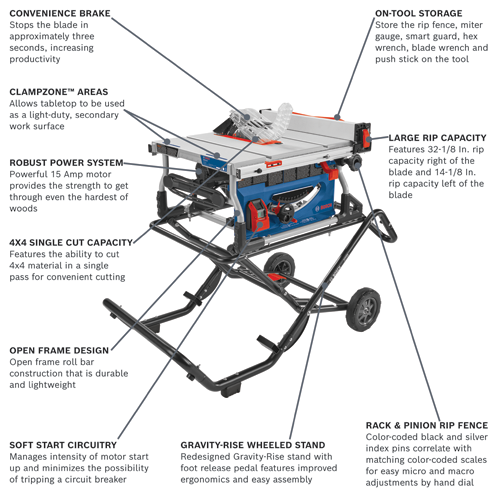
Credit: www.boschtools.com
Routine Cleaning Techniques
Keeping your table saw motor clean helps it run longer and better. Dirt and dust can cause damage if left unchecked.
Routine cleaning is simple and can prevent costly repairs. Follow these tips to maintain your saw motor.
Removing Dust And Debris
Dust and debris build up inside the motor can cause it to overheat. Use a soft brush to gently remove dust from accessible parts. Avoid using water or liquid cleaners.
- Unplug the saw before cleaning.
- Brush dust off motor housing and surrounding areas.
- Clean the blade guard and table surface.
- Remove large debris by hand carefully.
Cleaning Air Vents
Air vents keep the motor cool by letting air flow through. Blocked vents cause heat buildup and motor failure. Clean vents regularly to ensure good airflow.
| Cleaning Method | Details |
| Soft Brush | Remove dust gently from vent openings. |
| Vacuum Cleaner | Use low suction to clear dust inside vents. |
| Lint-Free Cloth | Wipe around vents to remove residue. |
Using Compressed Air Safely
Compressed air can blow out hidden dust but must be used with care. Incorrect use can push dirt deeper or damage motor parts.
- Wear safety glasses to protect your eyes.
- Use short, controlled bursts of air.
- Hold the nozzle at least six inches away from the motor.
- Avoid spraying air directly into bearings or wiring.
- Do not use high pressure settings.
Lubrication Tips
Keeping your table saw motor lubricated helps it run smoothly and last longer.
Proper lubrication reduces friction and prevents damage to moving parts.
Choosing The Right Lubricant
Use lubricants made for electric motors or machinery. Avoid thick grease that can clog parts.
- Light machine oil works well for small motors.
- Silicone-based lubricants resist dust and dirt.
- Avoid WD-40 as a long-term lubricant.
- Check the motor manual for recommended products.
Applying Lubricant Properly
Clean the motor parts before applying lubricant. Dirt can cause wear and tear.
| Step | Action |
| 1 | Turn off and unplug the table saw. |
| 2 | Remove dust and debris from motor parts. |
| 3 | Apply lubricant to bearings and moving parts. |
| 4 | Wipe off any excess lubricant. |
| 5 | Allow the lubricant to settle before use. |
Lubrication Frequency
Lubricate the motor regularly to keep it in good shape. Too little or too much can cause issues.
- Check the motor every 3 months for signs of dryness or noise.
- Apply lubricant if the motor feels dry or noisy.
- Adjust frequency based on usage and environment.
- Lubricate more often in dusty or humid places.
Inspecting Electrical Components
Regular inspection of electrical parts keeps your table saw motor running safely. Electrical issues can cause motor failure or accidents.
Checking these components helps spot problems early. This saves repair costs and extends motor life.
Checking Wiring Connections
Loose or damaged wires can stop the motor or cause shorts. Look for frayed wires, burns, or corrosion at connection points.
- Turn off power before inspecting.
- Use a screwdriver to tighten loose terminals.
- Replace damaged wires with the same gauge type.
- Check wire insulation for cracks or wear.
Examining Brushes And Commutators
Brushes transfer electricity to the motor’s spinning part. Worn brushes reduce performance and cause sparks.
| Component | What to Check | Signs of Wear |
| Brushes | Length and smooth movement | Short length, stuck or cracked |
| Commutators | Surface smoothness and cleanliness | Burn marks, rough or pitted surface |
Testing Switches And Controls
Switches control power flow to the motor. Faulty switches cause power loss or unsafe starts.
Test switches this way:
- Unplug the saw before testing.
- Use a multimeter to check continuity.
- Flip the switch on and off during the test.
- Replace switches with no continuity or inconsistent readings.
Preventive Measures For Longevity
Taking care of your table saw motor helps it last longer and work better. Regular maintenance keeps the motor safe from damage.
Simple habits can stop problems before they start. These tips focus on how to protect your motor daily.
Avoiding Overloading
Do not push your table saw motor beyond its limits. Overloading can cause overheating and damage the motor parts.
Use the right blade and feed wood at a steady pace. Avoid forcing the saw to cut through too much material at once.
- Check motor power rating before cutting thick wood
- Keep blade sharp to reduce strain
- Stop and let the motor cool if it feels hot
Proper Storage Practices
Store your table saw in a dry, clean place. Moisture and dust can cause rust and block air vents in the motor.
Cover the saw when not in use to keep dirt away. Avoid places with extreme heat or cold to protect motor parts.
- Use a dust cover or cloth
- Keep saw in a room with stable temperature
- Place saw off the floor to avoid moisture
Regular Professional Servicing
Have a skilled technician check your table saw motor regularly. They can find problems you might miss and fix them early.
Professional service includes cleaning, lubrication, and testing motor parts. This care improves motor life and performance.
- Schedule service every 6 to 12 months
- Ask for motor inspection and cleaning
- Replace worn brushes or belts as needed
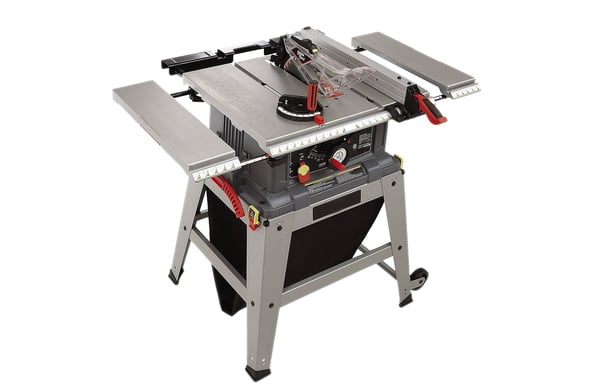
Credit: www.searspartsdirect.com
Troubleshooting Common Problems
Table saw motors sometimes have issues that stop work. Knowing how to spot and fix these problems saves time.
We will look at three common motor problems and easy ways to troubleshoot them.
Motor Won’t Start
If your motor does not start, check the power first. Make sure the saw is plugged in and the outlet works.
Look for blown fuses or tripped circuit breakers. These stop electricity from reaching the motor.
- Check power cord for damage
- Test the switch for faults
- Inspect motor brushes for wear
- Look for loose or disconnected wires
Motor Stalls During Use
A motor that stalls while cutting may be overloaded. This happens if the blade is dull or the wood is too hard.
Also, check for dirty or worn motor parts that cause extra friction and slow the motor down.
- Sharpen or replace the blade
- Do not push wood too fast
- Clean and lubricate motor parts
- Check for worn motor brushes
Unstable Motor Speed
If the motor speed changes or feels uneven, it may have electrical or mechanical problems. Loose connections can cause this.
Also, worn brushes or a dirty commutator can affect speed. Regular cleaning helps keep speed steady.
- Check all wiring connections
- Clean the commutator and brushes
- Replace worn motor brushes
- Inspect the motor bearings
Frequently Asked Questions
How Often Should I Clean My Table Saw Motor?
Cleaning your table saw motor every 3 to 6 months prevents dust buildup. Use compressed air and a soft brush to remove debris. Regular cleaning improves motor efficiency and extends its lifespan. Always unplug the saw before cleaning to ensure safety.
What Lubricants Are Best For Table Saw Motors?
Use light machine oil or silicone-based lubricants for table saw motors. Avoid heavy grease as it attracts dust and dirt. Apply lubricant to moving parts like bearings and shafts. Proper lubrication reduces friction and prevents motor overheating.
How Can I Prevent My Table Saw Motor From Overheating?
Ensure proper ventilation and avoid overloading the motor during use. Clean dust and debris regularly to maintain airflow. Use the saw within its recommended duty cycle. Overheating can damage motor windings and shorten its life.
When Should I Replace My Table Saw Motor Brushes?
Replace motor brushes when you notice sparking, reduced power, or inconsistent performance. Inspect brushes every 6 months or as recommended. Worn brushes can cause motor damage and poor cutting accuracy.
Conclusion
Maintaining your table saw motor keeps it running smoothly and safely. Regular cleaning stops dust from causing damage. Checking the belt and wiring helps avoid breakdowns. Lubricate moving parts to reduce wear and tear. Small efforts save money on repairs later.
A well-kept motor lasts longer and works better. Remember, simple care makes a big difference. Keep your tools ready for every project. Stay safe, and enjoy your woodworking work!