
Are you struggling to get precise measurements in your machining projects? Using a digital caliper can be a game-changer for your work, giving you quick and accurate results every time.
But if you’re not sure how to use one properly, you might be missing out on its full potential. This guide will walk you through everything you need to know to master your digital caliper and improve your machining skills.
Keep reading, and you’ll soon measure with confidence and accuracy like a pro.
Choosing The Right Digital Caliper
A digital caliper is a useful tool for measuring parts in machining. Picking the right one helps you get accurate results.
There are many types of digital calipers. You should also check important features and your budget before buying.
Types Of Digital Calipers
Digital calipers come in different styles for various tasks. The most common types are dial, vernier, and digital.
Digital calipers show measurements on a screen. They are easy to read and use for quick checks.
- Inside calipers measure the inner size of holes.
- Outside calipers measure the outer size of objects.
- Depth calipers measure the depth of holes or slots.
Key Features To Look For
Good digital calipers have clear screens and accurate readings. Look for features that make measuring easier.
- Large LCD display for easy reading
- Metric and inch measurement options
- Data hold function to freeze measurements
- Zero setting at any position for relative measuring
- Stainless steel body for durability
- Water and dust resistance for shop use
Check if the caliper can connect to a computer. This helps to save and analyze data.
Budget Considerations
Digital calipers vary in price. Decide how much you want to spend before buying one.
Basic models are affordable and good for simple tasks. Higher-end models offer more features and better accuracy.
- Entry-level calipers cost less and suit beginners
- Mid-range calipers have better build and accuracy
- Professional calipers include extra features and connectivity
Credit: www.penntoolco.com
Setting Up Your Caliper
Using a digital caliper correctly starts with proper setup. This ensures precise measurements for your machining projects.
Follow the steps below to prepare your caliper before measuring any parts or materials.
Calibrating For Accuracy
Calibration keeps your caliper measurements accurate. Check calibration regularly to avoid errors.
- Clean the caliper jaws to remove dust or debris.
- Close the jaws gently without forcing them.
- Check the reading; it should be zero.
- If not zero, use the calibration adjustment to fix it.
- Test with a gauge block or standard reference.
Zeroing The Display
Zeroing the display sets a baseline for all measurements. Do this every time you start using the caliper.
| Action | Result |
| Close jaws fully | Display shows zero |
| Press zero button | Reset measurement baseline |
| Open jaws slightly | Display shows current gap |
Battery Maintenance Tips
Good battery care keeps your caliper working well. Replace batteries before they run out completely.
- Turn off the caliper when not in use.
- Use the recommended battery type.
- Store the caliper in a dry place.
- Check battery contacts for corrosion.
- Replace batteries at the first sign of a weak display.
Basic Measuring Techniques
A digital caliper is a tool used to measure objects with high accuracy. It helps machinists check sizes quickly and precisely.
Knowing how to use a digital caliper correctly saves time and improves work quality. Below are basic techniques for common measurements.
Measuring Outside Dimensions
Outside dimensions are the external sizes of an object. Use the large jaws of the caliper to take these measurements.
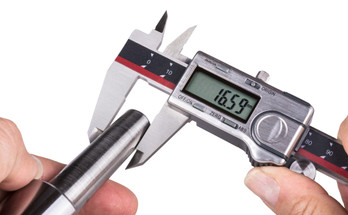
Place the object between the jaws and close them gently. Read the measurement on the digital display for an accurate size.
- Open the jaws wider than the object
- Place the object between the jaws
- Close the jaws until they touch the object
- Check the digital screen for the measurement
- Do not press too hard to avoid errors
Measuring Inside Dimensions
Inside dimensions measure the space inside an object, like a hole or slot. Use the smaller jaws at the top of the caliper.
Insert the jaws inside the space. Open them until they touch the inside walls. Read the size on the digital display.
- Start with the jaws closed
- Insert the smaller jaws inside the opening
- Open the jaws until they touch both sides
- Read the measurement on the screen
- Keep the caliper steady for accuracy
Measuring Depth And Steps
Depth and step measurements use the thin rod that extends from the end of the caliper. This measures holes and recess depths.
Place the end of the caliper on the surface. Slide the rod down until it touches the bottom. Read the depth on the display.
- Close the jaws completely
- Place the caliper base on the surface edge
- Extend the depth rod into the hole or step
- Slide the rod down until it reaches the bottom
- Check the digital display for the depth

Credit: device.report
Advanced Measurement Tips
Using a digital caliper correctly improves measurement accuracy. Small errors can cause big problems in machining. These tips help you avoid mistakes and get precise readings.
Understanding how to apply pressure and use your caliper’s functions can speed up work. Follow these guidelines to get the best results every time.
Avoiding Common Errors
Errors often come from poor handling or misreading the device. Keep these points in mind to reduce mistakes during measurement.
- Check zero reading before measuring
- Clean the caliper jaws and object
- Measure at right angles to the object
- Do not force the jaws on the part
- Keep the caliper steady while reading
Consistent Pressure Application
Applying the right pressure is key. Too much force can deform the part or caliper jaws. Too little pressure may cause loose contact and wrong readings.
| Pressure Level | Effect |
| Light | Loose grip, inaccurate measurement |
| Moderate | Correct reading without damage |
| Heavy | Possible part or tool damage |
Using Hold And Data Output Functions
The hold function lets you freeze the displayed measurement. This is useful when you cannot easily see the reading while measuring.
Data output can connect your caliper to a computer or device. It helps record measurements quickly and reduces manual errors.
Tips for Hold and Data Output:
- Press the hold button right after measuring
- Use data cables or wireless adapters if available
- Save data regularly to avoid loss
- Check compatibility of software with your caliper
Maintaining Your Digital Caliper
Taking care of your digital caliper keeps it accurate and reliable. Regular maintenance helps avoid mistakes in machining work.
This guide covers how to clean, store, calibrate, and fix common problems with your digital caliper.
Cleaning And Storage
Clean your caliper after each use to remove dust and debris. Use a soft cloth and avoid harsh chemicals.
- Wipe the jaws and measuring surfaces gently
- Use a small brush for hard-to-reach areas
- Keep the battery compartment dry
- Store the caliper in its case to protect it from damage
Regular Calibration Checks
Check calibration often to ensure your caliper measures accurately. Use gauge blocks or a calibration standard.
| Calibration Step | Action | Frequency |
| Zero Check | Close jaws and press zero button | Before each use |
| Gauge Block Measurement | Measure known size block and compare | Monthly or after heavy use |
| Battery Check | Replace if display dims or errors appear | Every 6 months or as needed |
Troubleshooting Common Issues
If your caliper gives odd readings or fails to turn on, try these fixes first.
- Clean the scale and contacts gently
- Replace the battery with a new one
- Reset the caliper by turning it off and on
- Check for physical damage or loose parts
- Consult the manual if errors persist

Credit: blocktobox.com
Applying Measurements In Machining
Using a digital caliper helps machinists get exact measurements. These measurements guide the machining process.
Accurate measuring ensures parts fit well and machines work smoothly. It reduces mistakes and saves time.
Transferring Data To Cnc Machines
Digital calipers give precise numbers that CNC machines use. This data controls how the machine cuts or shapes parts.
Often, measurements are entered into the CNC system manually or through software. This keeps machining accurate and consistent.
- Measure part dimensions with the digital caliper
- Input measurements into CNC machine controller
- Verify the data before starting the machining process
Quality Control Practices
Machining quality depends on checking parts during and after production. Digital calipers help check if parts meet specs.
Regular measuring finds errors early. This stops bad parts from moving forward and lowers waste.
- Measure key dimensions at different production stages
- Compare measurements to design specifications
- Record data to track quality trends
Improving Machining Accuracy
Using digital calipers correctly helps improve machining accuracy. Clean calipers and steady hands give better results.
Measure parts multiple times to check for consistency. Small changes in measurement can affect the final product.
- Calibrate the digital caliper regularly
- Use the caliper at the right angle and pressure
- Double-check critical measurements
Frequently Asked Questions
What Is A Digital Caliper Used For In Machining?
A digital caliper measures precise dimensions of machined parts. It provides accurate readings for inside, outside, depth, and step measurements. This tool helps ensure parts meet design specifications and tolerances. It is essential for quality control in machining processes.
How Do You Properly Read A Digital Caliper?
To read a digital caliper, turn it on and zero it at the closed jaw position. Measure the object by sliding the jaws and read the digital display. The reading shows the measurement in millimeters or inches instantly, reducing human error in reading.
How To Calibrate A Digital Caliper For Accuracy?
Calibrate a digital caliper by closing the jaws and pressing the zero button. Check measurements with a known standard like a gauge block. Regular calibration ensures precise readings and maintains machining quality standards. Calibration should be done before critical measurements.
Can Digital Calipers Measure Inside And Depth Dimensions?
Yes, digital calipers measure inside dimensions using the smaller jaws on top. Depth is measured using the depth rod that extends from the end. This versatility makes digital calipers useful for various machining measurement tasks.
Conclusion
Using a digital caliper makes measuring parts quick and precise. Practice reading the display carefully to avoid mistakes. Keep the tool clean and store it safely after use. Small checks can save big problems later. This guide helps you get started with confidence.
Take your time, measure twice, and cut once. Accurate measurements lead to better machining results every time.
