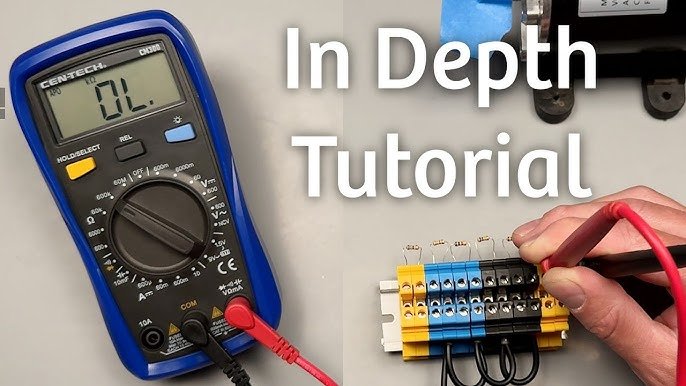
Are you new to using a multimeter and unsure where to start? You’re not alone.
A multimeter is a powerful tool that can help you check batteries, test circuits, and fix electrical problems at home. But if you’ve never used one before, it can feel confusing and overwhelming. Don’t worry—this guide will walk you through every step in a simple, clear way.
By the end, you’ll feel confident picking up your multimeter and knowing exactly what to do. Ready to unlock the power of this handy device? Let’s dive in!
Multimeter Basics
A multimeter is a tool that measures electrical values like voltage, current, and resistance. It helps you check if electrical parts work well.
Using a multimeter is simple. You need to understand its parts and how to use them safely.
Types Of Multimeters
There are two main types of multimeters: analog and digital. Each type shows readings differently.
Analog multimeters have a needle that moves over a scale. Digital multimeters show numbers on a screen.
- Analog Multimeter:Uses a moving needle to show values.
- Digital Multimeter (DMM):Displays values as numbers on a screen.
Key Parts And Functions
A multimeter has several parts that help you measure electrical values. Knowing each part helps you use it correctly.
- Display:Shows the measurement result.
- Dial/Selector Switch:Lets you choose what to measure (voltage, current, resistance).
- Probes:Two wires with metal tips to touch the circuit.
- Ports:Where you plug in the probes.
- Hold Button:Freezes the reading on the display (on some models).
Choose the right setting on the dial before measuring. Use the probes carefully to get accurate results.
Safety Tips
Safety is important when using a multimeter. Follow these tips to avoid injury or damage.
- Always start with the highest range if unsure about voltage or current.
- Check that the probes and wires are not damaged before use.
- Never touch the metal parts of the probes while measuring.
- Do not measure voltage or current beyond the multimeter’s limit.
- Turn off power to the circuit if possible before testing.
- Use a multimeter with proper ratings for your task.

Credit: www.youtube.com
Setting Up Your Multimeter
Using a multimeter for the first time can seem tricky. Setting it up correctly makes measuring safe and accurate.
This guide covers how to choose the right mode, insert test leads, and calibrate your multimeter properly.
Choosing The Right Mode
Your multimeter has different modes for measuring voltage, current, and resistance. Pick the correct one for your task to get accurate readings.
- Select “V” for voltage measurement. Use “AC” or “DC” depending on the power source.
- Choose “A” for current measurement, again selecting AC or DC.
- Set to “Ω” to measure resistance in circuits or components.
- Use continuity mode (often a diode symbol) to check if a circuit is complete.
Inserting The Test Leads
Test leads connect your multimeter to the circuit. Proper insertion is key to safety and correct readings.
| Lead Color | Where to Insert | Use |
| Black | COM (Common) | Ground or negative connection |
| Red | VΩmA or 10A | Positive connection; choose 10A for high current |
Check the ports before inserting leads to avoid damage or injury.
Calibrating The Device
Calibration ensures your multimeter shows correct values. Some models need manual calibration before use.
Use this quick checklist to calibrate your multimeter:
- Turn the dial to zero or calibration mode if available.
- Short the test leads together and adjust the dial to read zero.
- Check the manual for specific calibration steps for your model.
- Repeat calibration regularly for best results.
Measuring Voltage
Using a multimeter to measure voltage is a key skill for beginners. Voltage tells you the electric force that pushes current in a circuit.
This guide explains how to measure voltage safely and correctly with simple steps.
Ac Vs Dc Voltage
Voltage comes in two types: AC and DC. AC means alternating current, and DC means direct current.
AC voltage changes direction many times each second. DC voltage flows in one direction only.
- AC voltage is common in home power outlets.
- DC voltage is used in batteries and electronics.
- Multimeters can measure both AC and DC voltage.
- Choose the correct setting on your multimeter for accurate reading.
Step-by-step Voltage Testing
Start by turning on your multimeter and setting it to the voltage type you want to measure. Use the DC or AC setting depending on the source.
Connect the black probe to the common (COM) port and the red probe to the voltage (V) port on the multimeter.
- Touch the black probe to the negative or ground point of the circuit.
- Touch the red probe to the positive point of the circuit.
- Read the voltage value on the multimeter screen.
- Remove the probes carefully after the reading.
Common Voltage Measurement Mistakes
Beginners often make mistakes that affect readings or cause damage. Avoid these common errors for safe and correct use.
- Not selecting the right voltage type (AC or DC) on the multimeter.
- Using the wrong probe ports, like placing the red probe in the wrong slot.
- Touching metal parts of the probes during testing, which can cause shocks.
- Trying to measure voltage on a live circuit without proper safety.
- Setting the multimeter to a lower voltage range than the circuit voltage.

Credit: m.youtube.com
Checking Current
Using a multimeter to check current helps you understand how electricity flows in a circuit. This guide shows simple steps for beginners.
Always handle your multimeter carefully to get accurate readings and avoid damage.
Types Of Current Measurement
There are two main types of current you can measure: direct current (DC) and alternating current (AC). Your multimeter can measure both, but you must select the right setting.
- DC Current:Flows in one direction. Found in batteries and many electronics.
- AC Current:Changes direction periodically. Found in home power outlets.
Proper Connection Techniques
To measure current, connect the multimeter in series with the circuit. This means the current must flow through the meter.
- Turn off power before connecting the multimeter.
- Set the dial to the correct current type and range.
- Insert the red probe into the ampere (A) socket.
- Break the circuit at the point you want to measure.
- Connect the probes so current flows through the multimeter.
- Turn power back on and read the display.
Avoiding Overload
Using a multimeter incorrectly can cause overload and damage the device or circuit. Follow safety limits and settings.
| Action | Reason |
| Check the multimeter’s max current rating | To avoid blowing the fuse inside the meter |
| Start with the highest current range | Prevents overload if current is unknown |
| Never connect the meter in parallel when measuring current | Can cause a short circuit and damage |
| Replace blown fuses before next use | Ensures accurate and safe measurements |
Testing Resistance
A multimeter helps measure resistance in electrical parts. Resistance shows how much a part blocks electric current.
Testing resistance is useful for checking wires and devices. It tells if a part is working or broken.
Setting Resistance Mode
Turn the multimeter dial to the resistance setting. It is often marked with the Greek letter omega (Ω).
Choose the right range if your multimeter has manual ranges. Pick a higher range first to avoid damage.
- Turn dial to Ω symbol
- Select auto or manual range
- Connect probes to the meter
Reading Resistance Values
Touch the probes to the two points you want to test. The multimeter shows resistance in ohms (Ω).
A low number means little resistance. A very high number or “OL” means no connection or broken part.
- Hold probes steady on test points
- Watch the display for a number
- Compare number to the part’s specs
Troubleshooting Circuits
Use resistance testing to find broken wires or parts. Check each section of the circuit separately.
If resistance is higher than expected, the part may be damaged. Zero or near zero means a short circuit.
- Test wires and connections
- Look for unexpected resistance changes
- Replace parts that show bad resistance
Using Continuity Mode
A multimeter’s continuity mode checks if two points connect electrically. It helps find breaks in wires or circuits.
Using this mode is simple and saves time during repairs or testing. It often uses a beep sound to show continuity.
Identifying Continuity
Continuity means electricity flows freely between two points. The multimeter beeps or shows zero resistance if there is continuity.
- Set the multimeter to continuity mode.
- Touch the two test leads together to hear the beep.
- Place leads on the points you want to test.
- If it beeps, the circuit is continuous.
- No beep means a break or high resistance.
Practical Uses
Continuity mode helps in many common tasks. It checks cables, switches, and fuses quickly.
- Test if wires are connected inside a cable.
- Check if a switch is working properly.
- Find blown fuses in electrical devices.
- Locate breaks in circuit boards or wiring.
- Verify connections before powering a circuit.
Interpreting Results
Understanding readings helps you fix problems faster. Use sound and display to judge the circuit state.
| Multimeter Signal | Meaning |
| Beep sound | Good connection or short circuit |
| No beep | Open circuit or broken wire |
| Low resistance value | Strong connection |
| High resistance or OL | Weak or no connection |
Additional Features
A multimeter offers more than just voltage and current measurements. It has special features that help test different components. These features can make your work easier and more precise.
Learning how to use these extra functions can improve your skills. This guide covers diode testing, capacitance measurement, and temperature sensing.
Diode Testing
Diode testing checks if a diode works correctly. A good diode lets current flow one way and blocks it the other way. The multimeter shows a reading when the diode is good.
- Set the multimeter to diode mode.
- Connect the red lead to the diode’s anode.
- Connect the black lead to the diode’s cathode.
- Look for a voltage reading between 0.5V and 0.8V.
- Reverse the leads to check for no reading or OL.
Capacitance Measurement
Capacitance measurement shows how much charge a capacitor can hold. Use this feature to test if a capacitor is working or to find its value.
| Capacitance Range | Typical Unit |
| Small capacitors | Picofarads (pF) |
| Medium capacitors | Nanofarads (nF) |
| Large capacitors | Microfarads (µF) |
To measure capacitance, remove the capacitor from the circuit. Set the multimeter to capacitance mode, then connect the leads to the capacitor terminals. The screen will show the value.
Temperature Sensing
Some multimeters can measure temperature using a probe. This feature is helpful for checking heat in devices and environments.
- Attach the temperature probe to the multimeter.
- Set the dial to the temperature mode (°C or °F).
- Place the probe on or near the object to test.
- Read the temperature on the display.

Credit: medium.com
Tips For Accurate Readings
Using a multimeter correctly is important to get the right readings. Small mistakes can cause wrong results or damage the tool.
This guide helps beginners avoid errors and keep their multimeter working well.
Avoiding Common Errors
Many mistakes happen when people use a multimeter. Check the settings before measuring.
Make sure the probes connect well and you use the right mode for voltage, current, or resistance.
- Set the dial to the correct measurement type
- Connect probes to the right ports
- Do not touch metal parts during testing
- Check if the test leads are in good condition
- Start with the highest range if unsure
Maintaining Your Multimeter
Keep your multimeter clean and store it safely to last longer. Dirt and moisture can cause damage.
Regularly inspect the test leads and replace them if they are cracked or worn out.
- Wipe the multimeter with a dry cloth
- Store it in a dry, cool place
- Do not drop or expose it to water
- Check test leads for damage before use
- Use a protective case when not in use
When To Replace Batteries
Low batteries cause wrong readings or the multimeter to turn off. Watch for signs it needs new batteries.
Replace batteries promptly to keep your multimeter reliable and safe.
- Display dims or flickers
- Multimeter shuts off unexpectedly
- Readings are unstable or incorrect
- Battery test mode shows low power
- Replace with the battery type the manual recommends
Frequently Asked Questions
What Is A Multimeter Used For?
A multimeter measures voltage, current, and resistance in electrical circuits. It helps diagnose electrical problems and test components safely and accurately.
How Do I Set Up A Multimeter For Beginners?
Turn the dial to the desired measurement type, connect the probes correctly, and start testing. Always begin with the highest range to avoid damage.
Can A Multimeter Test Batteries Effectively?
Yes, a multimeter can check battery voltage and health. Set it to DC voltage, connect probes to battery terminals, and read the voltage.
Is It Safe To Use A Multimeter On Live Circuits?
Yes, but caution is necessary. Use proper settings, insulated probes, and avoid touching metal parts. Follow safety guidelines to prevent shocks or damage.
Conclusion
Understanding how to use a multimeter empowers you in basic electronics. Practice with simple tasks to build confidence. Start with measuring voltage and resistance. Always ensure safety by checking connections. Gradually, you’ll become more comfortable with its functions. Remember, patience and practice are key.
A multimeter is a valuable tool in your toolkit. With it, you can diagnose and solve many electrical problems. Keep learning, and soon, you’ll handle complex tasks with ease. Enjoy exploring the world of electronics with your new skills. Happy measuring!